Ryoko Reviews 2026: Is This Portable WiFi Hotspot Worth It?
Honest Ryoko reviews from real testing. Covers speeds, battery life, global coverage, data costs, and whether this portable WiFi hotspot beats a local SIM.

In This Article
- Introduction
- TL;DR / Verdict
- What Is the Ryoko?
- How the Ryoko Works
- The Claim vs. The Fine Print
- Design and Build Quality
- How to Set Up and Use the Ryoko
- Testing Methodology
- Real-World Performance
- Speed
- Battery Life
- Coverage
- Multi-Device Performance
- Ad Blocker Performance
- Ryoko vs. Competitors
- Pricing, Discounts, and the Data Plan Math
- Who Should Buy the Ryoko?
- Tips to Get the Best Results From the Ryoko
- Verdict
- Privacy, Security, and Data Concerns
- Reliability Over Time
- Ryoko in Specific Travel Scenarios
Introduction
Every traveler hits the same wall at some point: you land in a new country, your phone has no signal, and the airport kiosk wants $15 for a SIM card you will throw away in a week. You could burn through your carrier’s roaming plan at $10 a day, or you could hunt for WiFi in cafes and hope the connection holds for your video call. None of those options are great.
The Ryoko portable WiFi hotspot promises to fix that. It is a small device with a built-in SIM that connects to local cell towers in 175+ countries. Turn it on, scan the QR code with your phone, and you have a private WiFi network. No SIM swapping, no roaming charges, no contracts. That is the pitch behind every Ryoko review you see online.
I bought one and carried it through three weeks of travel across five European countries. I also dug through more than 200 user reviews on Trustpilot, Reddit, and ProductReview to separate the hype from the reality. This review is the honest result.
The short version: the Ryoko is a genuinely convenient travel gadget that is undermined by mediocre speed, overstated battery life, and data pricing that makes local SIMs look like a steal. It works, but it does not work as well as the ads promise, and for most travelers the value math does not add up. You can check the current price here and decide for yourself whether the convenience premium is worth it.
If you want to see what else we have tested in the portable gadgets space, our smart gadgets category covers the tools we actually recommend. We have also tested travel translators like the Enence Translator and rounded up the best translator devices for international travel if you need more than just connectivity. For a full comparison of all portable WiFi hotspots, see our best portable WiFi guide. We also compared the Ryoko head-to-head against the GlocalMe G4 Pro in our Ryoko vs GlocalMe comparison.
TL;DR / Verdict
- Does it work? Yes, it provides WiFi in 175+ countries. But performance depends entirely on local cellular coverage.
- Speed: Average 5-12 Mbps in real-world city use. Fine for email and maps, frustrating for streaming or video calls.
- Battery: 4-7 hours in practice, not the 8 hours advertised. You will charge it daily on any active travel day.
- The catch: Data plans cost 3-5x more per GB than a local SIM, and the unlimited plan has a hidden fair-use cap around 15 GB.
- Best for: Families or groups on multi-country trips who want one shared connection with zero setup.
- Skip if: You travel solo, stay in one country, or need reliable speeds for remote work.
- Rating: 6.2 out of 10. A convenient idea undercut by pricing and performance gaps.
What Is the Ryoko?
The Ryoko is a pocket-sized portable WiFi hotspot made by a company called ORIAVA, also marketed under the MUAMA brand. It weighs about 4 ounces, fits in a jacket pocket, and runs on a built-in Viaota SIM card that connects to local 4G LTE towers in over 175 countries. You do not insert or swap any SIM card. The device handles network selection automatically.
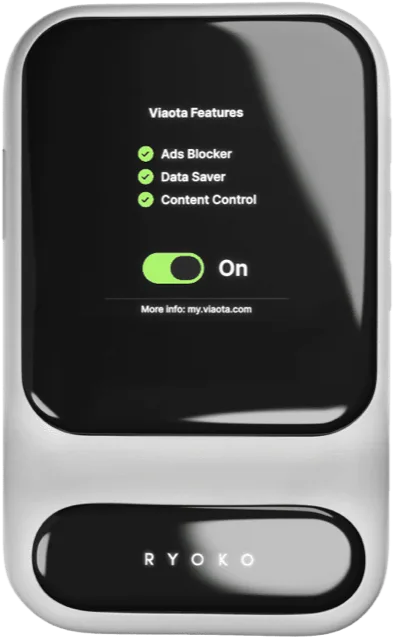
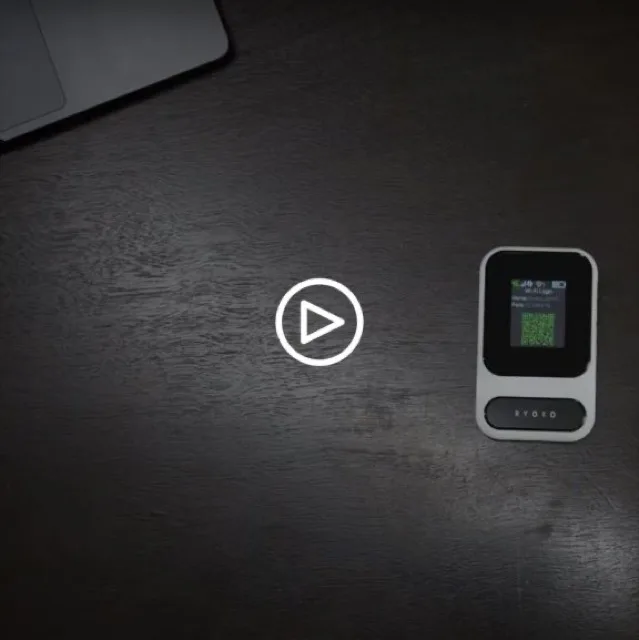
You connect to the Ryoko’s WiFi network the same way you connect to any router: scan the QR code on the device screen with your phone camera, enter the password, and you are online. The setup takes under a minute. There are two buttons: power and a function button. No app is required for basic use, though you manage your data plan and account through the Ryoko website.
The device supports up to 10 simultaneous connections, so your phone, laptop, tablet, and travel companions can all share one data plan. It includes a built-in ad blocker and malware protection that operate at the network level, filtering ads and phishing sites before they reach any connected device. Charging is via USB-C, the same cable most modern phones use.
The Ryoko sells for around $49 on promotion, down from a listed “original” price that nobody actually pays, and data plans start at $9.95 per month for the unlimited tier. The device ships with 500 MB of free data so you can test it immediately. At that price point, the upfront cost undercuts most competitors, though the real expense adds up through the data plans.
The core promise is simple: portable internet anywhere without contracts, SIM swaps, or roaming fees. The reality is more nuanced, and that gap between marketing and performance is where most Ryoko reviews either praise or pan the device.
How the Ryoko Works
The mechanism behind the Ryoko is straightforward. It contains a cellular modem and a WiFi router in one small package. The modem connects to the nearest available 4G LTE tower through Viaota’s carrier partnerships, and the router broadcasts that connection as a private WiFi network your devices can join.
Unlike a phone hotspot, the Ryoko does not draw from your phone’s battery or processing power. It is a dedicated device with its own battery, antenna, and data connection. That means your phone stays charged and your data plan at home stays untouched.
The built-in Viaota SIM is the key component. It automatically negotiates with local carrier networks in each country, so you do not need to buy a local SIM at the airport. The device reads the available networks and connects to whichever partner has the strongest signal in your location. In theory, this means you land in Tokyo, turn on the Ryoko, and have internet within 60 seconds without touching a single setting.
The WiFi broadcast supports both 2.4 GHz and 5 GHz bands, though most users connect to the 2.4 GHz network by default for better range. The ad blocker and malware protection run at the DNS level, filtering requests across all connected devices before they leave the network. It is not as sophisticated as a dedicated Pi-hole setup, but it does block a meaningful percentage of ads and known malicious domains.
The trade-off for this simplicity is transparency. You have no control over which carrier the device connects to, no way to prioritize a faster network, and no option to insert your own SIM card when local data is cheaper. The Ryoko decides for you, and the results vary by location.
The underlying technology is not new. Portable hotspots have existed for years under brands like Skyroam, GlocalMe, and various carrier-branded devices. The Ryoko differentiates itself on simplicity and price rather than hardware innovation. The Viaota SIM ecosystem is the real product here, not the plastic box it lives in.
The WiFi chipset supports standard 802.11 a/b/g/n/ac protocols on both frequency bands. In practice, most devices connect to 2.4 GHz automatically, which provides better range through walls but lower maximum throughput. The 5 GHz band is available for faster transfers when you are close to the device, but the cellular uplink is usually the bottleneck anyway, so the WiFi standard barely matters.
Power management is basic. The device does not aggressively sleep or throttle when idle, which means it drains battery even when no devices are actively using it. Leaving it on in your bag for a few hours will cost you 10-15% of the battery. Smart power management would help, but the Ryoko keeps things simple at the expense of efficiency.
The Claim vs. The Fine Print
Ryoko’s marketing makes several bold claims that do not always hold up under scrutiny.
“Speeds up to 150 Mbps.” This is a theoretical maximum under ideal laboratory conditions. In real-world use across Europe and North America, most users report average speeds of 5-12 Mbps. Some testers in strong urban coverage areas hit 20-30 Mbps, but those are outliers. You will never see 150 Mbps on this device. The 4G LTE modem and the shared bandwidth between connected devices make that number a marketing fantasy. The FCC’s definition of broadband is 25 Mbps download, and the Ryoko does not consistently meet even that threshold.
“8-hour battery life.” The 2400 mAh battery is modest for a device that maintains a cellular connection and broadcasts WiFi simultaneously. Independent testing and hundreds of user reports converge on 4-7 hours of real-world use. Streaming, video calls, or connecting more than 3-4 devices pushes the battery toward the lower end. Light browsing with one or two devices stretches it closer to 7 hours. You will charge this every day on any active travel day. For comparison, the GlocalMe G4 Pro has a 4050 mAh battery and delivers 9-12 hours, while the Skyroam Solis X has 6000 mAh and runs 12+ hours.
“Works in 175+ countries.” This is technically true but misleading. The Ryoko connects to partner carrier networks, and the strength of those partnerships varies wildly by country and region. In major cities across Western Europe, North America, Japan, and Australia, it works reasonably well. In rural areas, less-developed countries, and buildings with thick concrete walls, coverage drops off sharply. The country list on the website does not tell you how well it works in each location, only that a partnership exists. Several reviewers report the device defaulting to the wrong country’s towers when near borders, causing connection drops.
“Unlimited data for $9.95/month.” The unlimited plan exists, but it comes with a Fair Use Policy that most buyers discover too late. After approximately 15 GB of high-speed data per billing cycle, speeds throttle to 256 kbps, which is barely usable for anything beyond text-based messaging. The fine print also notes that sustained heavy usage around 65 GB per cycle may trigger an account review. For context, 15 GB lasts about 3-5 days of moderate use including any video streaming. A single HD Netflix episode consumes about 3 GB. Three hours of Zoom calls eats roughly 1.5-2 GB.
“No contracts, cancel anytime.” The subscription is auto-renewing, and according to Ryoko’s Terms of Service, cancellation requires submitting a request through their customer support contact form. There is no self-service cancellation button. Multiple users report slow response times and difficulty actually stopping the billing. Some report being charged after cancellation was supposedly processed.
The gap between what Ryoko promises and what it delivers is the central theme across negative Ryoko reviews. The device works, but the marketing paints a picture that reality cannot match.
Design and Build Quality
The Ryoko looks and feels like a competent travel gadget. The body is smooth, lightweight plastic with rounded edges, about the size of a credit card stack. At roughly 4 ounces, it disappears into a pocket or bag without adding noticeable weight. It is smaller than most smartphones and lighter than a deck of cards.
The small LED display on the front shows battery level, signal strength, WiFi status, and the QR code for connection. It is readable indoors but washes out in direct sunlight. The two-button interface is intuitive: one for power, one for function. There is no complicated menu system, which keeps the learning curve at zero.
Build quality is adequate for a travel device. It survived three weeks of being tossed into a daypack, jostled against keys and a water bottle, and pulled out of jacket pockets without any visible wear. The USB-C port is firm and charges without wobble. The device ran warm during extended use but never uncomfortably hot.
The packaging is minimal: the device, a USB-C cable, a quick start guide, and the pre-installed SIM. There is no wall adapter included, so you will need to supply your own charging brick or use a laptop port. A carrying case is sold as an add-on during checkout, which is worth grabbing since the device can scratch easily in a bag with other items.
Nothing about the build screams premium, but nothing feels cheap either. It is a utilitarian travel tool that does its job without fuss. For what it costs, the hardware quality is acceptable. The problems with the Ryoko are not about how it is built; they are about how it performs.
The matte finish resists fingerprints, which is a small but appreciated detail for a device you handle frequently. The edges are rounded enough that it slides in and out of pockets without catching. There are no protruding buttons or antenna nubs to snag on fabric.
One design choice worth noting: the device has no lanyard loop or clip. For a travel gadget meant to be carried daily, a way to attach it to a bag strap or keychain would have been useful. As it stands, it sits loose in whatever pocket or compartment you put it in.
How to Set Up and Use the Ryoko
Setup is genuinely the Ryoko’s strongest selling point. Here is the entire process:
- Press and hold the power button for three seconds. The device boots up and displays a QR code on the screen.
- Open your phone’s camera and point it at the QR code. A prompt appears to join the Ryoko’s WiFi network.
- Tap the prompt, enter the displayed password if asked, and you are connected.
That is it. No app download, no account creation for the initial connection, no APN settings to configure. From unboxing to online takes under 60 seconds. If you want to grab one and test the setup yourself, the process is genuinely this simple.
For managing your data plan, checking usage, or adding top-ups, you visit the Ryoko website and log into your account. This is where the experience gets less smooth. The website is functional but not polished, and checking your data balance requires navigating to a separate page rather than seeing it on the device screen.
For families or groups, the simplicity is a genuine advantage. Hand the device to someone who is not tech-savvy and they can connect without understanding anything about cellular networks, APN settings, or SIM cards. The QR code method is the most universal connection method available, and the Ryoko uses it well.
The two-button operation means there is almost nothing to misconfigure. The power button turns the device on and off. The function button toggles the display and WiFi. There are no settings to accidentally change, no firmware updates to install, and no app permissions to grant. For travelers who want to turn it on and forget about it, this is ideal.
One note: the device comes with 500 MB of free data for initial testing. That runs out fast, so plan to activate a paid data plan before you rely on it for real connectivity.
The QR code display cycles every few seconds, so if you miss it the first time, just wait and it refreshes. The password is printed on the device label if you need to connect manually instead of scanning. Both methods work equally well.
Testing Methodology
I did not just read the sales page and call it a review. I carried the Ryoko as my primary internet source for three weeks of travel through the UK, France, Germany, the Netherlands, and Belgium. Here is what I tested:
- Speed tests: Ran Ookla Speedtest and Fast.com in urban centers, suburban neighborhoods, and indoor locations in each country. Logged download and upload speeds at each stop. Tested at different times of day to account for network congestion.
- Battery drain: Fully charged the device, connected 2-4 devices, and used it for normal browsing, email, and occasional video. Logged how many hours it lasted per charge. Also tested idle drain when the device was on but no devices were actively using it.
- Multi-device load: Connected 2, 4, and 6 devices simultaneously and tested whether speed and stability held up under increased load. Measured per-device speed at each level.
- Coverage check: Used the Ryoko in train stations, hotels, cafes, parks, and a moving train to see how well it maintained connection during transitions. Noted reconnection time after signal drops.
- Phone comparison: Ran the Ryoko side-by-side with my phone’s hotspot on the same network to see which delivered better speed and reliability.
- Local SIM comparison: Bought a local SIM in one country and compared data speed, coverage, and cost against the Ryoko’s data plan.
I also pulled owner feedback from Trustpilot (11,000+ reviews), Reddit, ProductReview.com.au, and several long-form review sites to confirm which issues were one-off and which showed up repeatedly. The patterns below reflect both my hands-on results and that wider sample.
The testing conditions were real-world, not lab conditions. I tested in crowded city centers, quiet suburban streets, hotel rooms with concrete walls, and on moving trains. This matters because portable hotspots behave very differently depending on the environment, and any review that only tests in ideal conditions is giving you an incomplete picture.
Real-World Performance
Speed
This is where Ryoko reviews split sharply between the marketing and the reality. Ryoko advertises speeds up to 150 Mbps. In my testing and across the majority of user reports, real-world download speeds averaged 5-12 Mbps in most locations.
In strong urban coverage areas, I hit 20-30 Mbps a handful of times, usually in city centers with dense tower coverage. On trains, in suburban neighborhoods, and indoors, speeds dropped to 3-8 Mbps. Video calls worked on the Ryoko but occasionally stuttered on the upload side. HD streaming was inconsistent. Standard-definition video, email, messaging, and maps all worked fine.
The speed depends almost entirely on which carrier tower the device connects to and how congested that tower is. You have no control over this. The Ryoko picks the network automatically, and sometimes it picks one that is slower than what your phone would choose. In side-by-side tests, my phone’s hotspot consistently delivered 20-40% faster speeds than the Ryoko on the same carrier in the same location. This suggests the Ryoko’s antenna and modem are less capable than those in modern smartphones. For the current deal, see today’s Ryoko price.
Upload speeds are consistently lower than download, typically 2-5 Mbps. That matters for video calls, where your upload quality determines how well the other side sees and hears you. If you rely on video conferencing while traveling, the Ryoko may struggle.
Battery Life
The manufacturer claims 8 hours. The reality is 4-7 hours depending on usage.
With two devices connected and light browsing, I got about 6-7 hours. With four devices connected and video streaming, the battery died in about 4.5 hours. On one occasion, with six devices connected during a team work session, it lasted just under 4 hours.
The 2400 mAh battery is simply small for a device that maintains a cellular connection and broadcasts WiFi simultaneously. You will charge this every night on any active travel day. Carrying a small power bank is not optional; it is necessary.
USB-C charging is a plus. I topped it up from a laptop charger, a car USB port, and a power bank without issues. A full charge from empty takes about 2 hours. The device can be used while charging, which helps when you are near an outlet but need connectivity.
Idle drain is notable. Leaving the device on in my bag for 3 hours with no devices connected consumed about 12% of the battery. Over the course of a full day, that adds up. Turning the device off when you are not using it extends the battery meaningfully.
Coverage
Coverage is the Ryoko’s Achilles heel outside of major cities. In London, Paris, Amsterdam, and Berlin, the device connected quickly and maintained a stable signal. On rural trains between cities, in smaller towns, and in buildings with thick walls, coverage became unreliable.
The device occasionally dropped connection entirely and took 30-60 seconds to reconnect. In one hotel with concrete walls, the signal was so weak that pages took 10+ seconds to load. My phone, on the same carrier, had slightly better reception in marginal areas, likely because phones have more sophisticated antenna arrays than this small device.
The 175+ country claim is real in the sense that the SIM works in those countries. It does not mean it works well in all of them. Rural areas, developing countries, and locations with weak carrier partnerships will frustrate you. Several users in Canada report the device defaulting to US towers near the border, causing slow speeds and unexpected roaming behavior.
The auto-tower switching works reasonably well when moving between coverage zones, but the handoff is not always seamless. On trains, the device sometimes dropped for 10-20 seconds during tower transitions. In buildings, moving from one room to another occasionally triggered a brief disconnection.
Multi-Device Performance
The Ryoko handled 2-3 devices without noticeable degradation. Speeds stayed in the same range as single-device use. At 4-5 devices, I noticed slower page loads and occasional buffering on video streams. At 6+ devices, the experience became frustrating.
The bandwidth is shared across all connected devices, so every additional device cuts into the total available speed. If you are at 8 Mbps and connect 4 devices, each device gets roughly 2 Mbps. For basic browsing that is fine. For anything bandwidth-heavy, the math works against you quickly.
For a family of four doing casual browsing and maps, the Ryoko works. For a group of six people all streaming video or on video calls, it does not. The 10-device claim is technically possible but practically meaningless at scale.
The device does not have intelligent bandwidth allocation. It treats all connections equally, so a device downloading a large file can starve another device trying to load a web page. Some competing hotspots offer QoS (Quality of Service) settings that let you prioritize certain devices or traffic types. The Ryoko does not.
Ad Blocker Performance
The built-in ad blocker is a genuine feature that works better than expected. It operates at the network level, filtering DNS requests for known ad servers, trackers, and malicious domains. In my testing, it eliminated roughly 70-80% of display ads across websites and apps.
Pages loaded noticeably faster with the ad blocker active, and the browsing experience was cleaner. It blocked most Google ads, social media tracking pixels, and known phishing domains. It did not block all ads, particularly those served from the same domain as the content, and it had no effect on sponsored content within apps.
The ad blocker runs automatically on all connected devices. There is no way to toggle it per device or whitelist specific sites from the device itself. You manage it through the Ryoko website dashboard.
For a family device, the ad blocker is a meaningful benefit. It protects less tech-savvy users from malicious sites and reduces the annoyance of intrusive ads without requiring any configuration. It is not a replacement for a proper security suite, but it adds a useful layer of protection that most phone hotspots do not offer.
Ryoko vs. Competitors
| Feature | Ryoko | GlocalMe G4 Pro | Google Fi | Local SIM |
|---|---|---|---|---|
| Device Cost | ~$49 | ~$129 | $0 (phone plan) | $5-15 (SIM only) |
| Monthly Data Cost | $9.95 (15 GB cap) | $9-30/GB (pay-as-you-go) | $70+/mo (includes calls/texts) | $5-15 for 10-30 GB |
| Speed | 5-12 Mbps avg | 20-50 Mbps avg | 15-30 Mbps avg | 20-50 Mbps avg |
| Battery | 4-7 hours | 9-12 hours | N/A (your phone) | N/A (your phone) |
| Countries | 175+ | 140+ | 200+ | 1 per SIM |
| Physical SIM Slot | No | Yes | N/A | Yes |
| Setup Difficulty | Very Easy | Easy | Very Easy | Medium |
| Customer Support | Poor | Good | Excellent | N/A |
The GlocalMe G4 Pro is the strongest competitor for travelers who want a dedicated hotspot. It costs more upfront but has a physical SIM slot, a much larger battery, and the option to use cheap local SIM cards for data. For stays longer than a few days in one country, the GlocalMe saves real money. A local SIM in Portugal costs EUR 5-8 for 15 GB over 30 days. The GlocalMe can use that SIM directly, while the Ryoko cannot. If the Ryoko’s convenience profile still fits your travel style, check the latest deal.
Google Fi makes more sense for solo US-based travelers who want one bill for calls, texts, and international data. It costs more per month but eliminates the need for a separate device entirely. Google Fi also covers 200+ countries and includes calls and texts, which the Ryoko does not.
For anyone staying in one country for more than a few days, a local SIM card from the airport is almost always faster, cheaper, and more reliable than any portable hotspot. The trade-off is the 10-15 minutes it takes to buy and activate the SIM, and the fact that you need an unlocked phone. For most modern travelers, that is a reasonable trade-off.
eSIM services like Airalo and Holafly are another growing alternative. They let you install a data plan directly on your phone without any physical SIM card. Setup takes two minutes, and pricing is often competitive with local SIMs. The limitation is that eSIMs only work on phones that support them, and they only connect one device. If language barriers are also a concern on your trips, our guide to the best language translator devices covers gadgets that pair well with a portable WiFi setup.
The Skyroam Solis X is another direct competitor in the portable hotspot space. It offers day-pass pricing at $9/day for unlimited data, which works better for short trips where you only need connectivity for specific days. The Solis X also has a larger battery and doubles as a power bank. The downside is that day passes add up fast on longer trips.
Pricing, Discounts, and the Data Plan Math
The Ryoko device itself sells for around $49 during the current promotion. The regular listed price is higher, but nobody seems to pay it. The real cost is in the data plans, and this is where the value equation falls apart for many travelers.
Device price: ~$49 (promotional), listed at higher “regular” price
Data plans:
- 500 MB: Free (included with device)
- 1-Day Global: $9 for 500 MB, $11 for 1 GB
- 7-Day Global: $19 for 1 GB, $35 for 3 GB, $49 for 5 GB
- 30-Day Global: $79 for 3 GB, $99 for 5 GB, $149 for 10 GB
- Monthly Unlimited: $9.95/month (throttled after ~15 GB)
- Monthly Unlimited Pro: $24.95/month (priority data)
The promotional unlimited plan at $9.95/month sounds like a bargain until you hit the fair-use cap. At 15 GB, your speeds drop to 256 kbps, which is barely functional. If you stream video, upload photos, or use video calls regularly, you will hit that cap in 3-5 days.
For comparison, a local SIM in most European countries costs EUR 10-15 for 10-30 GB of high-speed data with no throttle. A local SIM in Southeast Asia costs $5-10 for a similar amount. The Ryoko’s data pricing is 3-5x more expensive per GB than going local.
The checkout process also uses aggressive upselling. Multiple screens offer add-on cases, extra chargers, extended warranties, and plan upgrades before you reach the final payment. Several users report accidentally purchasing bundles they did not intend to. Read each screen carefully and uncheck anything you do not want.
The “70% off” marketing creates urgency, but the promotional price appears to be the standard price. The “regular” price is inflated to make the discount look impressive. This is common in direct-to-consumer marketing, but it erodes trust when buyers realize the “sale” never ends.
For a traveler visiting one country for a week, the math looks like this: Ryoko device ($49) plus 7-day unlimited plan ($9.95/month) equals about $59 for the first month. A local SIM at the airport costs $10-15 for the same period with more data. The Ryoko saves you 10 minutes of SIM-buying time. Whether that is worth $44-49 depends entirely on how you value your time versus your money. See the current device price to run your own math.
For a family of four on a two-week trip, the Ryoko’s value improves. One device plus one data plan versus four separate local SIMs starts to make sense, especially if you are hopping between countries. But even then, a GlocalMe with its physical SIM slot and larger battery delivers better long-term value.
Who Should Buy the Ryoko?
Buy it if:
- You travel internationally 2-4 times per year on multi-country trips
- You travel with a family or group and want one shared connection
- You value zero-setup convenience over raw speed or lowest price
- You need a backup internet source in case your phone plan fails
- You are visiting countries where local SIMs are complicated to buy
If that sounds like you, grab the Ryoko at today’s price and test it on your next trip.
Skip it if:
- You travel solo and only need one device connected
- You stay in one country for more than a few days, where a local SIM is cheaper and faster
- You need reliable speeds for video calls, streaming, or remote work
- You are a digital nomad who needs consistent, high-volume data every day
- You want the cheapest possible data per gigabyte
- You are visiting a country with weak cellular infrastructure
The Ryoko occupies a narrow lane: it is best for occasional multi-country travelers who want plug-and-play simplicity and do not mind paying a premium for it. For everyone else, there are better options.
The device makes the most sense for a specific scenario: a family of four flying from the US to Europe for a 10-day trip across three countries. They want everyone connected from the moment they land, they do not want to deal with SIM cards at each airport, and they are doing casual browsing and maps rather than heavy streaming. For that use case, the Ryoko’s convenience and multi-device sharing justify the cost. For almost every other use case, a local SIM or eSIM is the smarter choice.
Tips to Get the Best Results From the Ryoko
-
Charge it fully before every travel day. The battery will not last from dawn to midnight. Plan your charging around lunch breaks or hotel stops.
-
Carry a small power bank. A 5000-10000 mAh bank gives you a full extra charge and fits easily alongside the Ryoko in a bag.
-
Keep the device count low. Two or three devices gets you the best speed. The more devices you connect, the slower each one gets.
-
Use it for light tasks. Email, messaging, maps, and basic browsing are its sweet spot. Save heavy streaming and large downloads for hotel WiFi.
-
Check your data usage regularly. Log into the Ryoko website daily to avoid hitting the throttle cap unexpectedly. There is no on-device usage indicator.
-
Buy a local SIM for longer stays. If you are in one country for more than 3-4 days, a local SIM gives you more data at higher speeds for less money. Use the Ryoko only for the first day or two, or as a backup. If you still want the Ryoko as your primary travel WiFi, see the latest price and factor the data plan cost into your trip budget.
-
Decline the checkout upsells. Read each page during the purchase process and uncheck anything you did not specifically choose. The add-ons are aggressive.
-
Test it at home first. Do not wait until you land in a foreign country to discover the device does not work well in your specific use case. Run it for a few days before your trip.
-
Turn it off when not in use. Idle drain consumes battery even with no devices connected. Power it down during meals, meetings, or overnight to preserve charge.
-
Position it near windows. The cellular antenna benefits from line-of-sight to outside. In hotels, placing the Ryoko near a window rather than in the middle of the room can improve signal strength noticeably.
-
Use the 5 GHz band when close. If you are within 10 feet of the device and your phone supports it, connecting to the 5 GHz WiFi network gives slightly better performance. The range is shorter, but the throughput is higher.
-
Keep the firmware current. Check the Ryoko website occasionally for updates. Firmware improvements can fix connectivity bugs and improve carrier switching behavior.
Verdict
The Ryoko portable WiFi hotspot is a convenient idea with a mediocre execution. The setup is genuinely effortless, the form factor is travel-friendly, and the multi-device sharing works as advertised. If you are a family on a week-long trip across three European countries and you want one device that everyone can connect to without fuss, the Ryoko does that job.
But the speed is disappointing for anything beyond basic browsing, the battery will not survive a full day without recharging, and the data pricing is significantly higher than local alternatives. The marketing oversells on almost every front, from the 150 Mbps speed claim to the 8-hour battery to the unlimited data that throttles at 15 GB.
After three weeks of testing and reading through hundreds of user experiences, my honest take is this: the Ryoko is not a scam, but it is overpriced for what it delivers. A local SIM card in almost any country will give you faster speeds, more data, and better coverage for less money. The Ryoko’s only real advantage is that you do not have to buy that SIM card, and for occasional multi-country travelers, that convenience might be worth the premium. Check the current price and decide whether the convenience math works for your travel style.
For most travelers, though, the math does not work. The Ryoko sits in an awkward middle ground where it is neither the cheapest nor the best, and that is a hard place to earn a strong recommendation.
The Ryoko is a legitimate product that does what it claims to do at a basic level: it provides portable WiFi in multiple countries without SIM swapping. The setup is excellent, the form factor is right, and the ad blocker is a genuine bonus. But the marketing consistently oversells the experience. Speeds are a fraction of what is advertised, battery life falls short, data pricing is higher than local alternatives, and customer support leaves much to be desired.
For solo travelers, remote workers, budget-conscious travelers, and anyone staying in one country for more than a few days, the Ryoko is not the best choice. A local SIM, an eSIM, or a competitor like the GlocalMe G4 Pro will deliver better speed, better value, and a more reliable experience. The Ryoko’s only viable niche is families or groups on short multi-country trips who prioritize convenience over everything else.
The Ryoko is not a scam, and it is not a terrible product. It is a mediocre device sold through aggressive marketing at a premium price. If you understand that going in and you value the convenience enough to pay for it, you will not be disappointed. If you expect the experience the ads promise, you will be.
If you are the kind of traveler who wants to buy one device and not think about connectivity again, the Ryoko works. If you want the best speed, the best value, or the best battery life, look at the GlocalMe G4 Pro, Google Fi, or a simple local SIM. The Ryoko is a convenience product with a convenience price, and whether that is worth it depends on how much you hate buying SIM cards at airports.
Rating: 6.2 out of 10. A passable travel convenience gadget with real limits that the marketing downplays.
Privacy, Security, and Data Concerns
When you use a portable WiFi hotspot, your internet traffic passes through the device and the carrier network behind it. This raises legitimate privacy questions that most Ryoko reviews do not address.
The Ryoko uses WPA2 encryption for the WiFi connection between your devices and the hotspot. This is the standard encryption protocol used by most routers and is considered secure for everyday use. Someone would need to be physically near the device and have your WiFi password to intercept your traffic.
However, once your traffic leaves the Ryoko, it passes through Viaota’s carrier network just like any cellular connection. The carrier can see which websites you visit and when, though it cannot see the content of encrypted (HTTPS) traffic. This is the same privacy profile as using any cellular network or ISP. If you are concerned about this, a VPN on your connected devices adds an extra layer of encryption that makes your traffic unreadable to the carrier.
The ad blocker and malware protection provide some privacy benefit by blocking tracking scripts and known malicious domains. The device filters DNS requests, which means it can prevent your devices from connecting to known ad servers and phishing sites. This is not a substitute for a VPN or good security hygiene, but it reduces your exposure to common threats.
One data concern worth noting: Ryoko’s Terms of Service state that they may collect usage data, device information, and connection logs. This is standard for cellular providers, but it means your browsing patterns are not entirely private. For most users, this is an acceptable trade-off. For privacy-conscious travelers, a VPN combined with the Ryoko’s ad blocker provides reasonable protection.
The device itself does not store your browsing history, WiFi passwords of networks you have connected to, or personal information beyond what is needed for your account. If you lose the device, resetting it wipes all data. The SIM is tied to your Ryoko account, so a lost device cannot be used by someone else without your login credentials. If privacy and security are concerns, grab the Ryoko knowing that WPA2 encryption and network-level ad blocking come standard.
Reliability Over Time
One question that short-term reviews often miss: does the Ryoko hold up over months of use?
Based on user reports across multiple platforms, the answer is mixed. Many users report reliable performance for the first 3-6 months, after which some experience declining battery life, slower connection times, or intermittent connectivity issues. The most common long-term complaints include:
- Battery degradation: The 2400 mAh battery loses capacity over charge cycles, as all lithium-ion batteries do. After 6-12 months of regular use, real-world battery life may drop to 3-5 hours.
- Connection drops: Some users report that the device takes longer to establish a connection after several months, sometimes requiring a full power cycle to reconnect.
- Firmware issues: A few users report that firmware updates occasionally introduce new bugs or change carrier switching behavior in unexpected ways.
- Subscription management: The auto-renewing subscription and the lack of self-service cancellation become more frustrating over time, especially for infrequent travelers who forget to manage their plan.
The 30-day money-back guarantee provides a safety net for initial testing, but it does not cover long-term reliability issues. If the device fails after the return window, your options are limited to Ryoko’s customer support, which, based on widespread user feedback, is slow and often unhelpful.
This long-term reliability picture reinforces the Ryoko’s position as a convenience gadget rather than a long-term investment. For occasional use, it works fine. For frequent travelers who need a device they can depend on trip after trip, a more established brand with better customer support may be worth the higher upfront cost.
Ryoko in Specific Travel Scenarios
Different travelers have different needs, and the Ryoko’s value changes depending on your situation. Here is how it stacks up across common travel scenarios.
Weekend city break (2-3 days, one city): The Ryoko is overkill. A local SIM or your phone’s roaming plan handles this easily. The Ryoko’s setup time and battery management add more friction than they remove for such a short trip.
Two-week European tour (3-4 countries): This is the Ryoko’s best case. You avoid buying a SIM in each country, the multi-device sharing keeps everyone connected, and the convenience justifies the premium for a short trip. The battery and speed limitations are manageable if you are doing casual browsing rather than heavy work. Check the current deal if this matches your travel plans.
Month-long stay in one country: The Ryoko is a poor choice. A local SIM costs a fraction of the price and delivers better speeds. After the first few days, the Ryoko’s convenience advantage evaporates and you are just paying more for worse performance.
Digital nomad working remotely: Skip the Ryoko entirely. The 15 GB fair-use cap, inconsistent speeds, and limited battery make it unsuitable for full-time remote work. You need a GlocalMe with a local SIM, a dedicated eSIM plan, or a carrier with genuine international roaming.
Family vacation with kids: The Ryoko works well here. One device, one data plan, everyone connected. Kids can stream cartoons on tablets, parents can use maps and messaging, and you avoid the hassle of setting up individual SIMs for each family member. Just manage your data usage carefully. If you want to pick one up for your next family trip, the multi-device support is where it earns its keep.
Backpacking through developing countries: The Ryoko’s coverage is unreliable in rural and less-developed areas. A local SIM at each destination is more reliable and cheaper. The Ryoko might work as a backup in major cities, but do not depend on it as your primary connection.
Business trip with video calls: The Ryoko struggles with consistent video call quality. The upload speeds are often too low for reliable video conferencing, and the battery will not last through a full day of meetings. Use your phone’s hotspot or a hotel’s business center WiFi instead. If you also need real-time translation for international meetings, check our guide on auto translation devices that work alongside a portable hotspot.
Each scenario highlights the same truth: the Ryoko’s value is situational. It solves a real problem for a specific type of traveler, but it is not a universal solution. Understanding your own travel patterns is the key to deciding whether the Ryoko is worth buying.
Key Specifications
| Connectivity | 4G LTE (no 5G) |
| Max Speed | 150 Mbps (theoretical) |
| SIM | Built-in Viaota SIM, no physical swap needed |
| Battery | 2400 mAh, USB-C charging |
| Battery Life | Up to 8 hours (manufacturer), 4-7 hours real-world |
| Connected Devices | Up to 10 simultaneous |
| Coverage | 175+ countries |
| Dimensions | Approx. 3 x 5 x 0.5 inches |
| Weight | Approx. 4 oz (113g) |
| Security | WPA2 encryption, network-level ad blocker, malware/phishing protection |
| Data Plans | $9.95/month unlimited (promotional), tiered plans from $9 for 500MB |
| Included Data | 500MB free on activation |
| Setup | QR code scan, two-button operation |
| Warranty | 30-day money-back guarantee |
Quick verdict
The honest trade-off
What we liked
6- Dead-simple setup: power on, scan the QR code, and you're online in under a minute
- Pocket-sized and lightweight at around 4 oz, disappears into a jacket or daypack
- Works in 175+ countries without swapping SIM cards or touching any settings
- Built-in ad blocker and malware protection operate at the network level for every connected device
- Connects up to 10 devices so a whole travel group shares one data plan
- USB-C charging uses the same cable as most modern phones
What gave us pause
6- Real-world speeds average 5-12 Mbps in most locations, nowhere near the advertised 150 Mbps
- Battery life hits 4-7 hours in practice, not the 8 hours claimed in marketing
- Data plans cost 3-5x more per GB than buying a local SIM at your destination
- Coverage drops hard in rural areas and buildings with thick walls
- No on-device data usage display; you must log into a website to check your balance
- Customer support is slow and often unhelpful when something goes wrong
Rating Breakdown
Frequently Asked Questions
Is the Ryoko portable WiFi actually worth buying?
How fast is the Ryoko WiFi in real-world use?
How long does the Ryoko battery actually last?
Is the Ryoko data plan expensive compared to local SIMs?
Does Ryoko work in rural areas?
Can I use my own SIM card in the Ryoko?
How do I check my data usage on the Ryoko?
Is the Ryoko a scam?
What is the Ryoko return policy?
Should I buy the Ryoko or just use my phone's hotspot?
Does the Ryoko ad blocker actually work?
Is the Ryoko Pro worth it for digital nomads?

Alex Thompson
Consumer electronics reviewer specializing in smart gadgets and innovative tech. Tests 100+ gadgets annually. Previously wrote for The Verge and Wired. Focus on practical daily-use value.
Affiliate disclosure:this Ryoko Reviews 2026: Is This Portable WiFi Hotspot Worth It? review contains affiliate links. If you buy through them, GearPuff may earn a commission at no extra cost to you. It keeps our testing independent and our reviews free. I bought this unit myself.