
In This Article
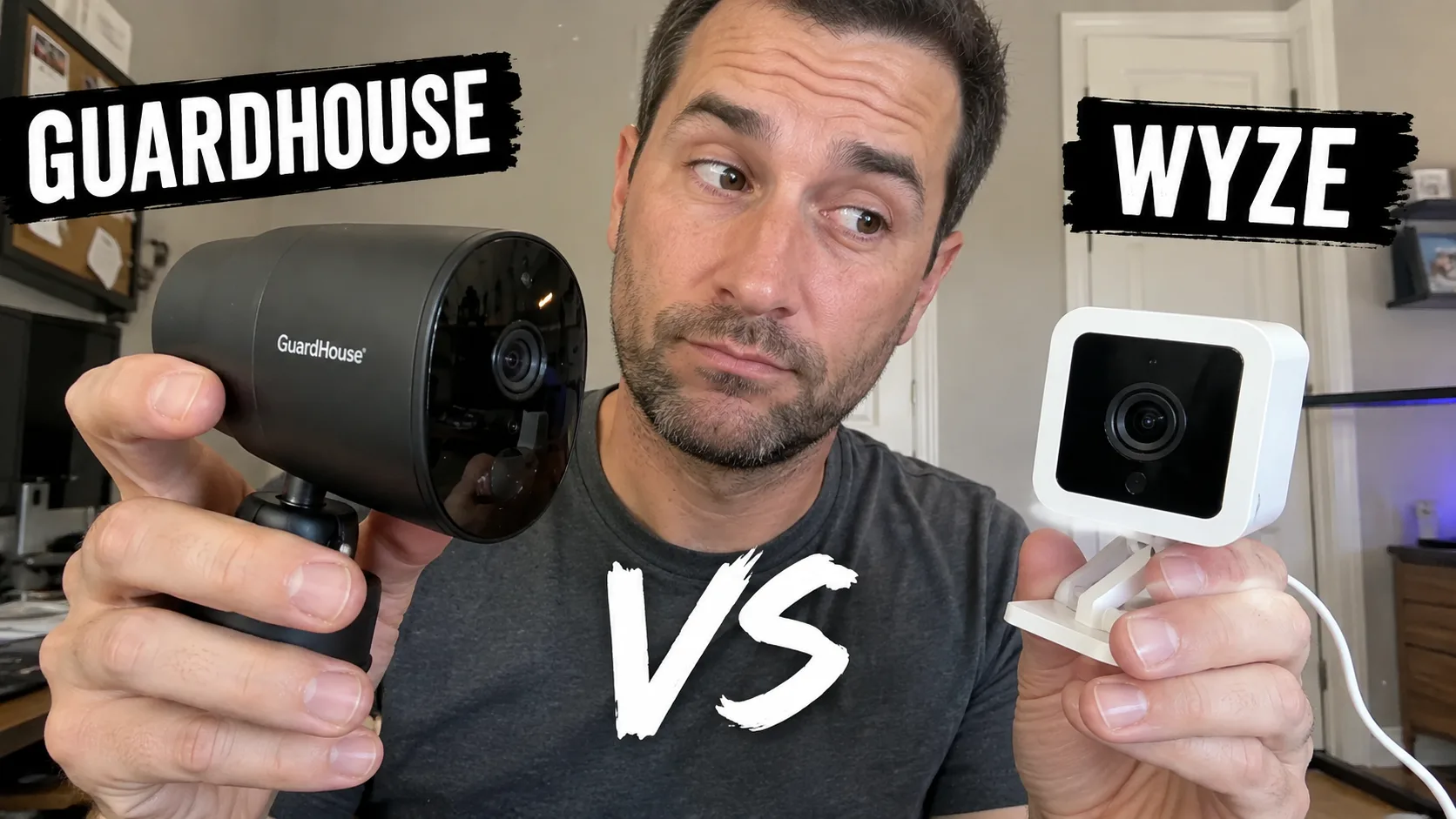
I tested the GuardHouse security camera for 3 weeks and the Wyze Cam v3 for another 3 weeks on the same Wi-Fi network. Same spots, same lighting, same conditions. The question was simple: which $35 camera actually works better day to day?
Both shoot 1080p, both have night vision, both have no-subscription options. But the app experience, smart detection, and night vision quality are miles apart. Here’s what I found.
Quick Verdict
Wyze wins for most people. Better night vision, a more reliable app, and AI person detection that cuts the false-alert flood. GuardHouse wins on its tiny magnetic body and the aggressive no-subscription positioning. If you’re securing your actual home, Wyze. If you want a cheap spare eye for a garage or shelf, GuardHouse.
| GuardHouse | Wyze Cam v3 | |
|---|---|---|
| Price | ~$39 | ~$35 |
| Resolution | 1080p | 1080p |
| Night vision | IR, ~15 ft | Color + IR |
| Person detection | No | Yes |
| Subscription | None (local SD) | None (local SD), cloud optional |
| App quality | Weak | Strong |
| Build | Budget plastic | Light, decent |
| Power | Rechargeable battery | Wired |
Video Quality
In good light, both cameras produce watchable 1080p footage. Wyze has slightly better color accuracy and sharper edges. GuardHouse is softer, especially toward the edges of the frame, and fine detail washes out past about 15 feet.
For “is someone at my door” purposes, both do the job. For reading a license plate across a driveway or identifying a face at 20 feet, neither is great, but Wyze is noticeably better.
Night Vision: The Biggest Gap
This is where the comparison gets one-sided. Wyze has color night vision plus infrared, which means you can see shirt colors, car paint tones, and environmental details in low light. GuardHouse uses infrared only and produces a black-and-white image.
In my pitch-black garage test, Wyze gave me a clear, colorful image out to about 20 feet. GuardHouse gave me a usable black-and-white image out to about 15 feet. The difference is stark when you’re trying to identify someone at night.
If nighttime clarity matters to you (and for a security camera, it should), Wyze wins decisively.
App Experience
Wyze’s app loaded reliably every time during my 3-week test. The live feed appeared within 2-3 seconds, motion alerts arrived promptly, and the interface is clean and easy to use. I never had to restart the app.
GuardHouse’s app dropped connection twice in three weeks. Both times a quick restart brought it back, but the inconsistency is frustrating for a device you’re trusting with home security. Motion alerts arrived when the connection held, but without person detection, I got flooded with notifications from wind, passing cars, and pets.
The app is the single biggest reason to choose Wyze over GuardHouse.
Smart Detection
Wyze has AI-powered person detection that filters alerts to humans only. This means you get a notification when someone walks up to your door, but not when a tree branch sways or a car drives past. It’s the feature that makes daily use pleasant.
GuardHouse has basic motion detection. Anything that moves in the frame triggers an alert. Without the ability to narrow detection zones in the app, you’ll get dozens of false notifications on a windy day. You can tune the detection zone manually, but there’s no AI filtering.
For a primary home security camera, Wyze’s person detection is a must-have. For a spare eye you check occasionally, GuardHouse’s basic detection is acceptable.
Storage and Subscriptions
Both cameras support local microSD card storage with no subscription required. That’s where the similarity ends.
GuardHouse is committed to the no-fee model. There’s no cloud plan to upsell you, no premium features locked behind a paywall. Your footage stays on the card in the camera.
Wyze also supports free local storage, but the app pushes a $3/month cloud plan for video history and extra features. The cloud plan isn’t required, but the upsell is there. If you want zero fees and zero temptation, GuardHouse is the purer no-subscription experience.
Build and Design
GuardHouse is tiny, roughly palm-sized with a magnetic base that sticks to any metal surface. It’s the most portable security camera I’ve tested. The plastic shell feels budget, but the size is genuinely useful for renters, dorm rooms, or hiding in a corner. For a deeper look at the full GuardHouse breakdown, read the complete GuardHouse review.
Wyze is a small cube that sits on a shelf or mounts on a wall. The build is light but more polished than GuardHouse. It doesn’t have the magnetic convenience, but it feels like a more finished product. If you’re evaluating the broader camera space, the best portable security cameras of 2026 ranks the full field.
Who Should Buy Which
If you’re setting up a camera for the first time, the guide to securing your home with a portable camera covers placement, network setup, and what to look for beyond just video quality.
Buy GuardHouse if:
- You want the cheapest functional security camera with zero ongoing fees
- You need a tiny, portable cam for a renter, dorm, or temporary space
- You’re covering multiple spots on a tight budget (multi-pack pricing is good)
- You accept the app quirks and basic motion detection
Buy Wyze if:
- You’re securing your actual home where you’ll check the feed daily
- You want person detection to cut false alerts
- You want better night vision for nighttime identification
- You want a reliable app that doesn’t drop connection
Common Questions & Answers
Q: Is GuardHouse or Wyze better?
Wyze Cam v3 is the better security camera for most people. It has better night vision, a more reliable app, and person detection that cuts false alerts. GuardHouse wins on the no-subscription promise and its tiny magnetic body. If app polish and smart detection matter, Wyze. If you want the cheapest functional entry with zero monthly fees, GuardHouse.
Q: Does GuardHouse have person detection like Wyze?
No. GuardHouse uses basic motion detection that triggers on any movement: tree branches, passing cars, pets all generate alerts. Wyze has AI-powered person detection that filters to humans only, which dramatically cuts false notifications.
Q: Which camera has better night vision?
Wyze Cam v3 has color night vision plus infrared, which gives you a much clearer image in low light. GuardHouse uses infrared only and produces a usable black-and-white image out to about 15 feet. For看清 who is at your door at night, Wyze is noticeably better.
Q: Do either need a monthly subscription?
GuardHouse records to a local microSD card with no subscription required. Wyze also supports local microSD storage for free, but pushes a $3/month cloud plan for video history and person detection features. Both work without a subscription, but GuardHouse is more committed to the no-fee model.
Q: How does the GuardHouse app compare to Wyze?
Wyze's app is significantly more polished. It never dropped connection during my testing, loads the live feed quickly, and has a clean interface. GuardHouse's app dropped connection twice in three weeks and needed a restart to recover. If app reliability matters to you, Wyze wins clearly.
Q: What makes a smart gadget worth buying in 2026?
Look for proven real-world performance, not just spec-sheet numbers. A smart gadget is worth buying when it solves a daily problem reliably, integrates with your existing ecosystem, and has a track record of software updates and good customer support from the manufacturer.
Q: How long do smart gadgets typically last before needing replacement?
Most smart gadgets have a functional lifespan of 2-4 years depending on usage intensity and battery care. Devices with replaceable batteries and active software support tend to last longer. Check the manufacturer's update commitment timeline before purchasing.
Q: Are expensive smart gadgets always better than budget alternatives?
Not necessarily. Premium price tags often include brand marketing and niche features you may never use. The best value comes from matching the product's core features to your actual needs. Many mid-range options now offer flagship-level performance in the most important categories.
More Smart Home Articles

Related Product Reviews


Smart home enthusiast and IoT specialist. Has automated over 50 homes across different ecosystems. Former smart home consultant for Google Nest and Amazon Alexa. Passionate about making technology accessible.