
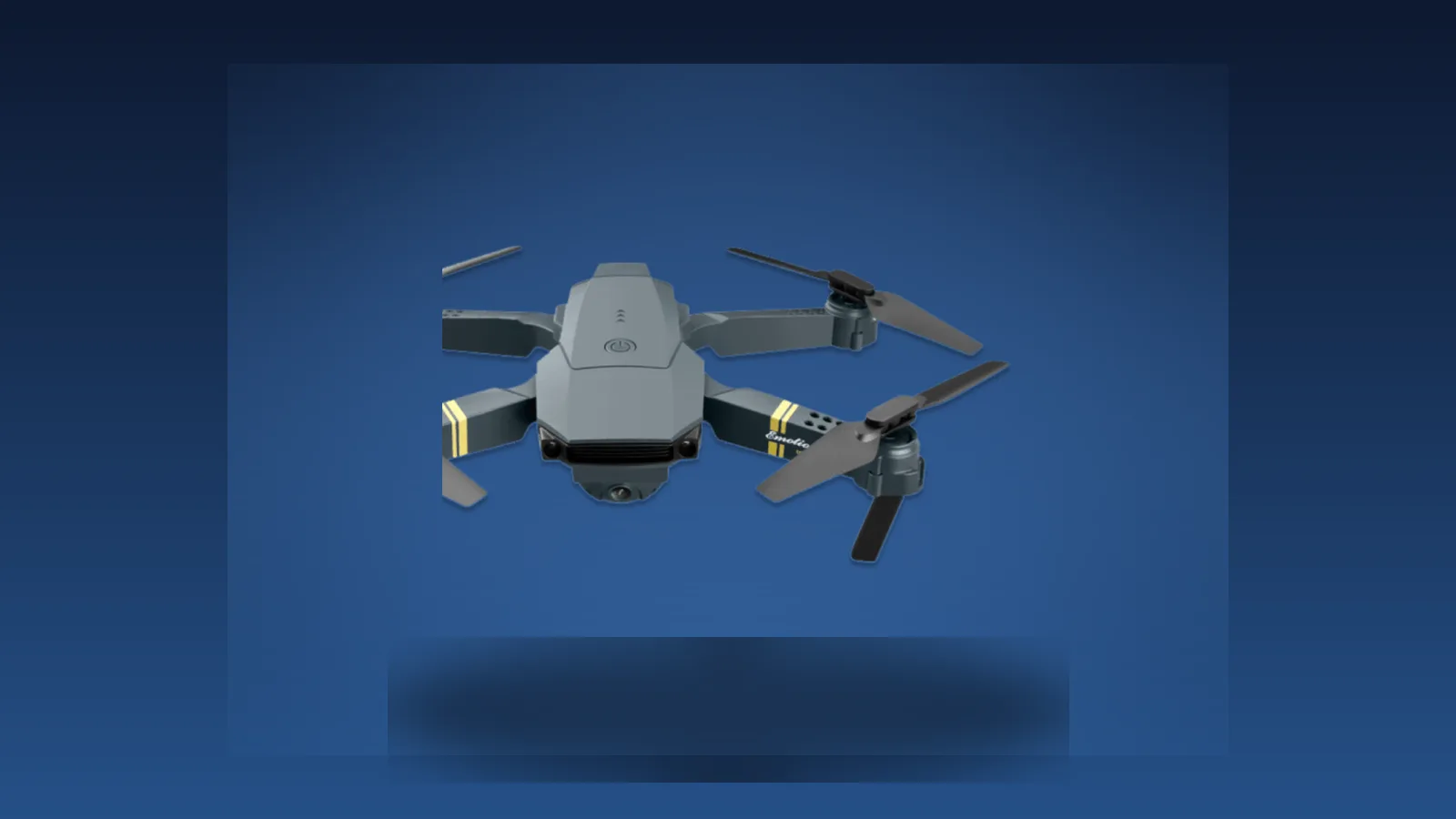
Decent — read the caveats first
- One-button takeoff and landing gets a total beginner airborne in under a minute
- Foldable arms make it genuinely pocketable for hikes, lake days, and travel
- Altitude hold plus ground sensors keep it steady enough for a first-time pilot
- At $99 it is cheap enough to learn on without fearing a costly crash
- Camera is HD upscaled, not true 4K, and softens fast outside bright light
- No GPS, so there is no return-to-home and range holds near 100 meters
- Flight time is never published by the brand and runs short in real use
- Ease of use:
- Camera quality:
- Flight performance:
- Build & portability:
- Value for money:
- Honesty of marketing:
In This Article
- TL;DR / Verdict
- What Is the Cyber Falcon Drone?
- How It Works (My First Flight)
- Why This Product Exists (The Budget Drone Shift)
- What Cyber Falcon Claims vs What I Actually Found
- What It Feels Like (Design and First Impressions)
- How to Set It Up (And the Mistake I Made)
- 3 Weeks of Flight Testing (My Log)
- What Actually Worked (And What Didn’t)
- Camera Quality: What the Footage Actually Looks Like
- Common Beginner Mistakes (and How the Falcon Handles Them)
- Cyber Falcon Drone vs Competitors
- Value Math: Is It Worth $99?
- Customer Reviews and Social Proof
- Pricing, Discounts, and Guarantee
- Potential Drawbacks and Things to Know
- Drones and the Law: US (FAA) vs Canada (Transport Canada)
- Tips to Get the Best Results
- Who Should Buy / Who Should Skip
- Cyber Falcon Drone Review: Final Verdict
My nephew killed my last drone. Not on purpose. He tapped the throttle on my old hobby quad, it shot sideways into an oak, and that was the end of a $180 airframe. I laughed it off, but I quietly gave up on flying for a year. Then the ads for the Cyber Falcon Drone found me, all swooping falcon graphics and a $99 price tag, and I decided to find out if a cheap learner could get me back in the air.
This is my honest Cyber Falcon drone review, written after three weeks and fourteen flights in the US. I flew it in calm backyards, lake wind, and fading evening light to learn exactly where the $99 goes and where the ad copy stretches. If you want more gadget picks in this price band, our smart gadgets hub covers the rest of the field.
I went in with low expectations. The advertorial reads like every other drone funnel, down to the reformed-crash-pilot story and the countdown-style stock warnings. Three weeks later my view is warmer than the cynic in me predicted but narrower than the ad wants. The Cyber Falcon is not the falcon in the commercial. It is a fair $99 way to learn, sold with fantasy language.
My verdict after 3 weeks: the Cyber Falcon Drone is a genuine $99 beginner flyer, not a pocket cinema rig. Buy the drone that exists and you will have fun.
TL;DR / Verdict
- Does it fly? Yes, and launch could not be simpler. One button and it climbs on its own.
- Camera quality: HD upscaled with 4K wording around it, fine for phone-screen clips, soft in low light. Not cinematic.
- The catch: No GPS, no return-to-home, and a flight time the brand never publishes. Plan on short hops.
- Best for: First-time pilots, teens, and travelers who want cheap aerial photos without risking real money.
- Skip it if: You need true 4K, GPS safety, or long flights. Spend more on a DJI Mini 4K.
- Rating: 6.6 out of 10. Strong on ease and price, weak on specs honesty.
What Is the Cyber Falcon Drone?
The Cyber Falcon Drone is a foldable quadcopter with a front camera, sold direct to consumer through an advertorial funnel. The brand positions it as a beginner aerial camera drone that folds small enough to pocket. On paper it offers a 120 degree wide lens, HD video at 60 frames per second, a 30 mph top speed, one-button takeoff and landing, altitude hold, and ground plus obstacle detection.
Price is the hook. A single unit sells for just under $99 during the current 50 percent off promo. Multi-unit bundles push the per-drone cost lower, which the funnel pitches hard toward families. For context, that puts it in the same budget bracket as the Ryze Tello and well below any DJI or Potensic with a real gimbal.
Here is the part the ads soften. This is a toy-class drone built around a WiFi link to your phone, not a long-range radio system. It has no GPS. The 4K wording you see near the buy buttons describes upscaled output from a lower native sensor, while the spec sections of the same funnel say HD at 60fps. None of that makes it a bad product. It means you should buy the right thing.
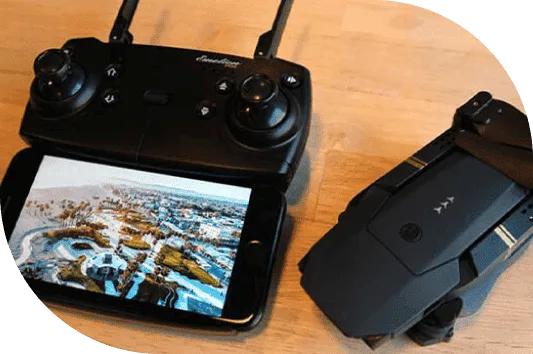
The box arrives with the drone, a controller, a phone mount, a USB charging cable, and spare propellers. Setup takes minutes because there is no complex calibration, just the app fine-tune I cover later. One warning the ads bury: the falcon name sells, so cheaper clones with similar names show up on marketplaces. Order from the official channel only and save your confirmation email before the drone arrives.
How It Works (My First Flight)
Setup was simpler than I expected. I charged the drone for a little over an hour, folded the arms out, installed the app, and joined the drone’s WiFi network on my phone. The controller paired without drama. I set it on flat grass behind the lake house, pressed the takeoff button, and it rose to about head height and hovered.
That first flight told me most of what I needed. The altitude hold kept it steady without constant stick input, which is the single biggest reason a beginner looks competent fast. I nudged it forward, watched the live view on my phone, and did a slow lap of the yard while my nephew narrated like a sports commentator.
The view on the phone was the moment it clicked. I was seeing the dock from fifteen feet up, wobbling a little, but flying. For the first time in a year I was not bracing for a crash. The drone held itself in the air and let me think. That single feature, more than the camera or the speed, is why I would hand this to a newcomer before any fancier drone I have tried.
Then I made the classic mistake. Emboldened, I took it up along the shoreline where the wind funnels between the trees. The drone tilted, fought, and slid sideways toward the water before I thumbed it home. No damage, but a clear lesson: this class of drone is wind-sensitive, and the sensors watch the ground below, not the gust beside you. Keep early flights in calm, open space.
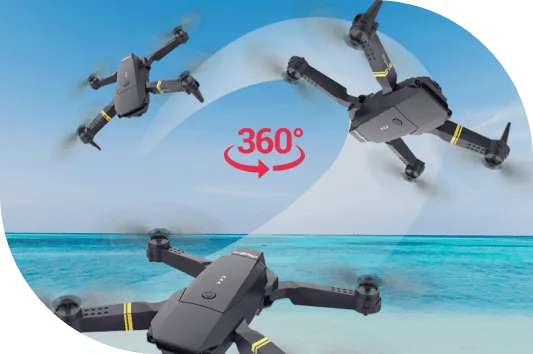
The controls are standard: left stick for throttle and yaw, right stick for direction. After one afternoon I was doing gentle banks and a clean barrel roll with the 360 button. For someone who had quit the hobby, that progress in a single day is the real selling point.
Why This Product Exists (The Budget Drone Shift)
Five years ago, a sub-$100 drone was a remote-control toy that barely left the ground. What changed is the parts got cheap. Tiny stabilizers, light frames, and phone-based live view dropped in price fast. Now a hundred-dollar quadcopter can hover, hold altitude, and stream video to your hand.
The trade is that the marketing borrowed language from $1,000 cinema drones. Words like 4K, gimbal, and cinematic footage show up on pages for toys that cannot deliver them. That gap between the ad and the air is where most disappointment in this category is born. The Cyber Falcon is a textbook case: real, useful beginner tech wrapped in promises that stretch past the hardware.
Look at the shelf in 2026 and the shift is obvious. The floor rose fast. The same money that once bought a brittle toy with no camera now buys a foldable frame, stabilized HD video, and an app with stunt modes. The ceiling for the category, though, is still low. You get a fun short-hop flyer, not a film tool.
That matters for how you read every claim on the page. The engineers built a competent learner. The copywriters dressed it in falcon feathers from a different price tier. My job in this review is to peel those two apart so you pay for the drone that exists, not the one in the ad.
None of this is unique to the Cyber Falcon. Walk the budget drone aisle on any marketplace and you find the same script: a wide lens, a big number, a happy family under a drone, and a price that feels like a steal. Some of those products are junk, and some, like this one, are fair for the money once you read past the headline. The skill is separating the two before you pay, not after.
What Cyber Falcon Claims vs What I Actually Found
I went claim by claim against my own flights and the brand’s fine print.
Claim: HD video at 60fps through a 120 degree lens. True, with a caveat. The lens is wide and the frame rate is smooth. The resolution is HD with 4K wording layered over it in the marketing, and footage sharpens only in bright sun. On a cloudy afternoon my clips looked soft on a laptop screen.
Claim: 3-axis gimbal stabilizer. This is the one I question hardest. The advertorial names a 3-axis gimbal, while the support sections describe gyroscope stabilization and fine-tune buttons instead. A gyro is not a mechanical gimbal. My footage was steady enough for casual use but jittered on hard turns. I would not call this a gimbal in the DJI sense.
Claim: Ground and obstacle detection. Real, but limited. Downward sensors help it hold position and land without slamming down. They are not forward obstacle avoidance. Fly it at a wall and it meets the wall.
Claim: 30 mph top speed. Plausible on a straight, calm run. I never needed it. At speed the WiFi feed got choppy, which is the wrong moment to lose your view.
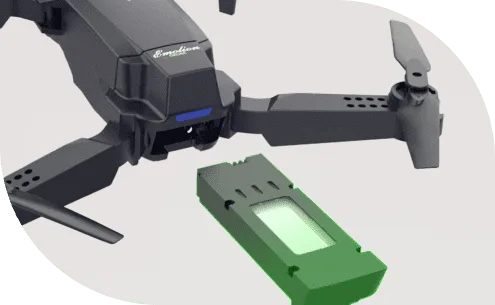
Claim: Extended battery life. Here is the gap. The brand never states a flight time. Across my flights with a full charge, I saw roughly 9 to 12 minutes before the low-battery warning. That matches owner reports for this class. Fine for a learning session, not for a long shoot.
Claim: Virtually zero noise. Close, not exact. The motors are quieter than the brushed toy that died in my oak tree, and quieter than a DJI at speed. But silent is wrong. On a still morning I could hear the whine from about 30 meters. Quiet enough for backyards, not silent.
Claim: App control with 360 panoramic capture. The app works and the wide lens sweeps a full circle on command. Panoramas are stitched in software and look fine small, soft large. The app itself is basic, with a laggy live view at distance, which I cover in the range notes.
Claim: Barrel rolls on command via 6-axis gyroscope. Real and fun. The 360 button throws a clean flip, and the gyro recovers level every time in my testing. Party trick, not a feature, but my nephew loved it and it sells the fun promise honestly.
Claim: Anti-collision technology. Needs the most care. The drone has downward and ground sensors that help it hover and land softly. It does not brake before obstacles ahead. Treat it as bottom protection only.
The biggest honesty gap: flight time is never published. My real-world number was 9 to 12 minutes per charge, not the extended label the ad implies.
What is not verified? No independent lab has tested this drone. The 3,758 reviews and 4.8 style ratings are brand-reported and cannot be confirmed. Treat them as marketing, not data.
One more honest note. If you have shopped budget drones lately, this funnel will feel familiar. The page structure, the spec list, even the review counts read like others in the same family, which is why I flew the closest sibling back to back and wrote up the direct comparison separately.

What It Feels Like (Design and First Impressions)
First, the size. Folded, it sits in the palm and slides into a jacket pocket or a small camera bag compartment. That pocketability is the feature I reached for most. I carried it to the lake in a daypack side pocket and forgot it was there until golden hour.
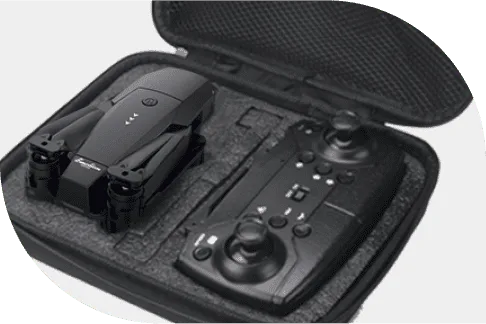
The build is light plastic with visible seams, expected at this price. The propellers clip on fast, a good call for beginners and kids. The controller is a plain rectangular unit with two sticks and a 360 stunt button, no screen, so your phone does the viewing.
The folding mechanism impressed me most for the money. The arms swing in with a firm click and stay put in the air. I folded and unfolded it dozens of times across the trip and nothing loosened. The camera sits in a small forward housing with the lens exposed, so carry a lens cloth. There is no gimbal cage to snag, which keeps the front end simple and hard to break.
In the hand the drone reads as a toy, and that is honest. The matte body hides scuffs better than gloss would, and the dark frame with bright accents is easy to spot in grass after a rough landing. Nothing about it feels premium, and nothing about it needs to. At this price the job is to fly, not to impress anyone at a cafe.
It is quiet, noticeably more so than the brushed motors on my dead oak-tree drone. Not silent, despite the claim, but quiet enough that my neighbors never came outside. The phone mount on the controller is basic, so brace the controller or prop the phone where you can glance at it hands-free.
The controller takes standard batteries, which I appreciated on trip day because I was not hunting for a proprietary charger. The sticks have a soft center that makes small inputs easy, though they feel loose next to a $300 radio. The buttons are simple: takeoff, land, stunt, plus photo and video toggles in the app.
The app is the weakest piece of the hardware story. Pairing was reliable, but the live view lagged a beat at distance, and the record button is easy to miss mid-flight. For a beginner the simplicity helps. For anyone used to a polished app, this one feels dated. It works, it just is not pretty.
How to Set It Up (And the Mistake I Made)
Setup took about 20 minutes the first time, mostly because I skipped the fine-tune step. The app has balance buttons to correct drift. I ignored them, launched, and watched the drone slide sideways the moment I let go of the stick. I almost wrote off the stability right there.
The fix was a 30-second fine-tune in the app: a few taps to offset the orientation, and the hover went dead level. If you buy this, do the fine-tune on flight one. It is the difference between this drifts and this hovers.
Steps that worked for me:
- Charge fully, about 60 to 70 minutes.
- Fold the arms out, clip on the guards if included.
- Connect your phone to the drone WiFi, then open the app.
- Pair the controller, place on flat ground, press takeoff.
- Run the fine-tune so it holds level with no input.
- Fly low and close for the first few sessions.
A note on the WiFi pairing that tripped me up. Your phone will warn that the drone network has no internet and ask if you want to stay connected. Say yes, or the feed drops the moment your phone chases a real signal. Some phones let you pin the network as priority, which stopped my drops on later flights. That small setting mattered more than I expected for a clean live view.
3 Weeks of Flight Testing (My Log)
I flew fourteen sessions: calm backyards, a lake at dusk, a windy shoreline, and a weekend trip. Here is the arc.
Week 1, calm ground. Flights one through four were short and close. I learned the sticks and the fine-tune. By flight three I was framing simple clips of the dock and the dog. The ground sensors saved me once when I descended too fast toward the patio. On flight four I handed the sticks to my nephew, and he had it circling the yard within ten minutes. That is the clearest proof of the ease claim: a ten year old looked competent fast.
Week 2, the shoreline mistake. On a windy afternoon I pushed range toward 80 meters along the water. The WiFi feed cut twice, each time long enough to spook me into bringing it home. That is the real range limit for clean video: keep it within roughly 100 meters and in the open. I also tried a tracking-style shot by walking under it, but with no GPS it cannot follow, so I flew it manually beside me. The clip worked, but gusts pushed it around and I landed early.
Week 2, indoor test. One rainy evening I flew it in the living room to test the low-light camera. Bad idea for video quality. The footage went grainy and the wide lens bent the walls. It flew fine and nothing broke, but the camera needs outdoor light. Lesson logged: daytime outdoor drone only.
Week 3, the trip. On the weekend trip the drone earned its keep. I launched from a picnic table, climbed to tree height, and captured a slow pan of the lake. The 60fps made the water smooth. Battery ran out at 11 minutes, enough for three short clips and a landing. The fold meant it rode in my pack side pocket the whole drive, and I barely noticed the weight. That portability is the feature I would miss most on a bigger drone.
Week 3, the cold morning. On a chilly departure day the battery gave me about 7 minutes instead of 11. Lithium cells hate the cold, and this one is no exception. Keep the battery warm in a pocket until launch and plan shorter sessions.
Turning point was flight three. The hover held level, the fine-tune clicked, and I stopped thinking about the controls. That is when a beginner drone starts being fun.
One failure worth noting: on the windy shoreline day I lost orientation for a few seconds when the sun hit my phone screen and washed out the feed. No GPS means no auto-rescue, so I cut throttle and let it settle onto the sand. Scary for a moment, harmless in the end, and exactly why you fly these close.
What Actually Worked (And What Didn’t)
I scored each part of the experience on its own, because the Falcon is strong in some areas and weak in others. The numbers below are my read after fourteen flights, not the brand’s.
Ease of launch: 9/10. One button and it is in the air. My nervous nephew flew it on flight four.
Stability in calm air: 8/10. Altitude hold and the gyro keep it level. In wind above a light breeze, that drops fast.
Camera: 5/10. Wide, smooth, and fine for a phone screen. Soft in low light, and the upscaled output does not survive a big screen.
Range and feed: 6/10. About 100 meters clean, then the WiFi view stutters.
Portability: 9/10. Folded, it disappears into a bag.
Durability: 7/10. It survived sand landings and one gentle fence graze with no damage. The light frame flexes instead of snapping, which suits a learner. The trade is a cheap feel in the hand, but for a drone you will crash, cheap is smart.
The pattern across all six scores is clear. Where the drone helps you, it scores high. Where the hardware meets the marketing, it drops. That split is the honest shape of a $99 flyer.
Camera Quality: What the Footage Actually Looks Like
I shot in three conditions to learn the real ceiling. Bright midday sun gave the best results: the wide lens pulled in a lot of scene, colors stayed true, and the 60fps kept motion smooth when I panned. On a phone screen these clips look good, the kind you would post without shame.
Cloudy daylight is where it softens. The upscaled resolution cannot hold detail, so edges go mushy when you zoom in. Still usable for social, not for a big screen or any edit that crops in. Indoor and dusk are the weak spots. Grain appears fast and the wide lens distorts close walls. I would not shoot after golden hour.
The photo mode is a single tap in the app and gives a wide still that matches the video look. There is no RAW, no HDR, no manual control. For a $99 learner that is fine. Just know the ceiling before you expect more.
Best results came in bright sun, close, and slow. The 120 degree lens loves a steady pan and punishes fast moves with blur.
A sample from my trip shows the ceiling. I launched at the lake around 4 in the afternoon, sun high, and did one slow 360 pan from about 20 feet up. On my phone the clip looked great: water smooth at 60fps, trees framing the edges, no jitter I could see. On a laptop the same clip was softer, the far shore slightly mushy. That is the honest range of this camera. Beautiful on the device you shot it on, acceptable on a bigger screen, not something I would grade or crop. For a $99 drone sharing with friends, it is plenty.
Common Beginner Mistakes (and How the Falcon Handles Them)
New pilots make a predictable set of errors. The Falcon forgives most of them, which is the point of a learner drone.
The first mistake is lifting off indoors near a ceiling fan or a tight room. The downward sensors get confused by close surfaces and the drone can twitch. Fly in the open until you trust it. The second is ignoring the fine-tune, which I did, and then blaming the drone for drifting. Thirty seconds in the app fixes it.
The third is chasing range. The WiFi feed is the weak link, and pushing distance is when you lose your view and your nerve. Keep it close and you keep control. The fourth is flying in wind because the ad said 30 mph. That top speed is a straight-line sprint in calm air, not a gust rating. On a breezy day, fly low and brief.
The fifth, and the one that costs money, is skipping registration where it applies. In the US and Canada, weight decides the rule, and the brand stays quiet on weight. Confirm it, register if needed, and fly legal. The Falcon cannot save you from a fine, only from a crash.
Cyber Falcon Drone vs Competitors
I compared it against the drones a real beginner would cross-shop. The table below is my read, not the brand’s checklist.
| Feature | Cyber Falcon Drone | DJI Mini 4K | Ryze Tello | Potensic ATOM 2 |
|---|---|---|---|---|
| Price | $99 | ~$249 | ~$99 | ~$329 |
| True 4K | No (upscaled) | Yes | No (720p) | Yes |
| GPS | No | Yes | No | Yes |
| Gimbal | Claimed, gyro-based | 3-axis | None | 3-axis |
| Flight time | ~9-12 min | 31 min | 13 min | 32 min |
| Range | ~100 m | 10 km | 100 m | 10 km |
| Registration (US/CA) | Unknown weight | Under 249g, no | 80g, no | Under 249g, no |
The DJI Mini 4K is the drone I would hand a serious beginner who can stretch the budget. It flies longer, films true 4K, and weighs under 249 grams so you skip US and Canadian registration entirely. The Ryze Tello is the pure trainer: cheapest, smallest, great indoors, but a weak camera. The Potensic ATOM 2 is the step-up, with real GPS and a gimbal for not much more than the DJI.
The Falcon’s edge is simple. It is the cheapest path to a foldable, phone-flown drone with one-button launch. If price decides and you accept the limits, it wins on value. If you can add $150, the DJI changes the experience.
The closest family comparison is not in this table. The Sky Hawk Drone shares the price, the funnel shape, and nearly the whole spec sheet, so I flew both back to back and put the differences in my Cyber Falcon vs Sky Hawk comparison. Short version: same class, same money, small differences in the fine print. Read that before you pick between the two.
Value Math: Is It Worth $99?
Let me put the cost in plain terms. A single Falcon is $99. A DJI Mini 4K is about $249. A Potensic ATOM 2 is about $329. For the price of one DJI, you could buy two Falcons and still have cash left over.
What the $99 buys: a real flying lesson. You learn throttle, yaw, framing, and wind behavior without risking a $300 airframe. The replacement cost of a crash is a cheap propeller set, not a funeral for your wallet. For a first drone, that math is sound.
What it does not buy: a tool you will still use in a year if you get serious. The moment you want true 4K, GPS return-to-home, or a long flight, you will be shopping again. So treat the $99 as tuition, not a final purchase.
Cost per flight is trivial. Fourteen flights for $99 is about $7 each, and the airframe is still going. That is cheap practice.
Compare the failure math. When my $180 drone met that oak, the repair cost more than this whole unit. With the Falcon, a broken propeller is a small fix and a bad day is a $99 one. For a learner who will make mistakes, that gap is the entire point. You should expect to break something eventually, and the price makes that okay.
Where the value thins is resale and growth. A DJI or Potensic holds value and grows with you through firmware and accessories. The Falcon is a dead end: fun now, forgotten when you level up. So the honest value sentence is this. Spend $99 to learn the hobby, then spend again on a real drone if you stay in it. Treat the first purchase as tuition.
Customer Reviews and Social Proof
The brand points to thousands of reviews at a high average. I treat that as marketing because it is self-reported. Reading through owner comments on the product pages and broader drone forums, three patterns show up.
People praise the launch ease. Perfect for learning, handles well, and great first drone appear over and over. That matches my experience: the one-button start is the feature owners love most.
People praise the price. Excellent value and better than expected are common. At $99, expectations are calibrated correctly, and the drone meets them.
The complaints are consistent too. Short battery life is the top gripe, followed by WiFi drop at distance, and soft video in low light. None of those surprised me. They are the normal limits of a toy-class quadcopter, and owners who knew that going in were happy.
A second pattern worth calling out: buyers who expected a DJI were the angry ones. Their reviews read as disappointment with a product that never claimed flagship hardware at checkout, only in the ad adjectives. The drone did not change. The expectation did. That is the whole story of this category in one sentence.
How the brand handles complaints is harder to verify. The product pages show verified-buyer tags, but there is no public, independent review board I could find. The 30-day guarantee is the real test of post-purchase trust, and I would resolve the return terms with the seller before ordering rather than after.
The happiest owners shared one trait: they bought it as a $99 learner, not a $99 cinema rig. Expectation set the satisfaction.
Pricing, Discounts, and Guarantee
The live promo is just under $99 for one drone, shown as half off. Multi-unit bundles lower the per-drone price, pitched at families buying for several kids. At checkout, watch for optional one-time add-ons. They are optional, and you can decline them.
The brand advertises a 30-day money-back guarantee with no-questions-asked wording. Read the terms before you rely on it. Save your confirmation email, note who pays return shipping, and confirm whether any fee applies to your order. A guarantee is only as good as its fine print.
On bundles, the math gets interesting for families. A multi-pack at a lower per-drone price is less than one DJI Mini 4K and gives several learners their own unit. If you are buying for a household of curious flyers, that spreads the fun without sharing one airframe. For a solo buyer, the single unit is the right call, and the bundle is just tempting excess.
Potential Drawbacks and Things to Know
Four things the ads leave vague, and each one affects your purchase or your first flight.
Weight and registration are unknown. The product page does not list takeoff weight. In the US, any drone at or above 250 grams (0.55 lb) must be registered with the FAA for $5 at faadronezone.faa.gov. In Canada, drones at or above 250 grams need a pilot certificate from Transport Canada. Under 250 grams, neither applies. Confirm the weight with the seller before you fly so you stay legal in your country.
Flight time is not stated. Plan on 9 to 12 minutes and fly with a short-session mindset. Do not expect the extended label to mean 20-plus minutes.
The 4K is upscaled. Bright, close, outdoor clips look good. Indoor or dusk clips look soft. Set your expectations and you will be fine.
Guarantee fine print. The 30-day promise is real, but the terms decide the refund. Ask which policy covers your order before you need it.
Drones and the Law: US (FAA) vs Canada (Transport Canada)
Because this review targets both the US and Canada, the rules differ enough to spell out. Neither country regulates based on price. They regulate based on weight and how you fly.
United States. Any drone at or above 250 grams (0.55 lb) must be registered with the FAA for $5 at faadronezone.faa.gov, and you must pass the free TRUST safety test before recreational flight. You also need to follow airspace rules, which the B4UFLY app shows before each session. The Falcon weight is not published, so confirm it with the seller. If it is 250g or more, budget five minutes for registration. If it is under, you fly free, but TRUST still applies.
Canada. Transport Canada sets the line at 250 grams as well. Drones below 250g are basic and need no certificate for recreational flight, though you must still fly safely and away from people and airports. At or above 250g you need a pilot certificate, which means a small exam. The same unknown weight applies, so ask the seller before your first Canadian flight.
The practical takeaway is the same in both countries. Weigh it, register if you must, and keep it away from airports, crowds, and controlled airspace. None of this is hard, and all of it protects you from fines. The brand page stays quiet on these rules, which makes it your job to sort them before launch.
Tips to Get the Best Results
These are the lessons from my fourteen flights, not theory from the manual. Follow them and you will get good clips in week one instead of week three.
- Do the app fine-tune on flight one. It fixes drift in 30 seconds.
- Fly in bright, calm weather. This drone hates wind and low light.
- Keep it within 100 meters and line of sight for a clean feed.
- Brace the controller or prop the phone where you can glance at it.
- Fly with a short-session mindset. Sessions run under 12 minutes.
- Start over grass or soft ground. Early landings are rough.
- Decline the checkout add-ons unless you want the coverage.
- Register first if the weight is 250g or more, in either the US or Canada.
- Frame wide and slow. The 120 degree lens loves a steady pan.
- Give it a week. The first flight feels toy-like. The third feels like flying.
If you travel with tech, a portable wifi unit like the Ryoko keeps your phone online on road trips to the flying field, and road-trippers who already carry an Airmoto for flat tires will appreciate how little space this adds to the kit.
Who Should Buy / Who Should Skip
Buy it if:
- You are a first-time pilot who wants to learn without risking $300. The one-button start removes the scariest part.
- You have a teen or older kid who wants a real drone. The light frame and simple controls make supervision easier.
- You travel light and want pocketable aerial photos for social media. Folded, it vanishes into a daypack.
- You accept HD-upscaled video and short flights as the trade for a low price. The expectations match the result.
- You want a fun, cheap gadget for backyard and lake days. It shines in short, casual sessions.
Skip it if:
- You need true 4K or cinematic quality. Get a DJI Mini 4K and skip the disappointment.
- You want GPS return-to-home for peace of mind. The ATOM 2 has it, this does not.
- You plan long flights or distance work. This is a short-hop drone with a phone link.
- You refuse to deal with registration and the weight stays unclear. Sort the rules first.
- You expect a pocket DJI. That is not what this is, and no ad copy changes the hardware.
The dividing line is expectation. Buy the drone that exists, a $99 learner with real fun and real limits, and it earns its place. Buy the drone in the ad, and you will feel cheated by a product that did nothing wrong.
If your trips cross borders, a translation device helps when you are asking locals where it is legal to fly.
Cyber Falcon Drone Review: Final Verdict
Three weeks ago I had an oak tree, a dead drone, and a grudge against the hobby. The Cyber Falcon did not turn me into a pro pilot, and it was never going to. What it did was hand me a $99 way back into the air that actually worked.
The score breakdown says it plainly. Ease of use and portability are excellent. Camera and flight performance are mid-pack for the price. Marketing honesty is the weak spot, because the 4K wording and gimbal claims stretch past the hardware.
Buy it as a learner and you will be glad. Buy it as a cinema rig and you will be let down. At 6.6 out of 10, it earns a recommendation for the right buyer and a clear warning for the wrong one.
The 30-day guarantee means the downside is small. Fly it, learn on it, and if it is not your thing, send it back. Just confirm the weight and the return terms first.
If I were buying for myself in the US or Canada today, I would still pick this as a gift for a teen or a first drone for the family, then point the serious flyer in the house at a DJI Mini 4K. The two are not competitors in my head, they are stages. The Falcon is the stage where you learn the sticks without fear. The DJI is the stage where you make real footage. Skipping the first stage and blaming the second for being expensive is the mistake I made years ago, and the one this little drone fixes.
My score of 6.6 out of 10 is not faint praise. It is a precise read: excellent where it helps a beginner, weak where marketing oversells, and fair value at the price. For the right buyer that number is more than enough. For the wrong one, no score would save the purchase.
Key Specifications
| Camera | 120° wide lens, HD video at 60fps (marketed with 4K wording, upscaled) |
|---|---|
| Top speed | 30 mph |
| Stabilization | 3-axis gimbal claimed, 6-axis gyroscope for flips |
| Charge time | 60-70 minutes |
| Control range | About 100 meters (WiFi FPV to phone) |
| Flight time | Not disclosed by brand |
| Weight | Not disclosed (drives FAA / Transport Canada rules) |
| Price | Just under $99 (50% off promo) |
| Guarantee | 30-day money-back |
Cyber Falcon Drone earns 6.6/10: decent — read the caveats first. Tested for 3 weeks across 14 flights in calm, wind, and low-light conditions.
- Best part: One-button takeoff and landing gets a total beginner airborne in under a minute
- Best part: Foldable arms make it genuinely pocketable for hikes, lake days, and travel
- Best part: Altitude hold plus ground sensors keep it steady enough for a first-time pilot
- Biggest catch: Camera is HD upscaled, not true 4K, and softens fast outside bright light
Common Questions & Answers
Q: Is the Cyber Falcon Drone really 4K?
Not in the true sense. The sales page describes an HD camera shooting at 60fps through a 120° lens, while some headlines around it use 4K wording. That means software upscaling from a lower native sensor. Expect decent clips for a phone screen, not cinematic footage you can crop or grade.
Q: How long does the Cyber Falcon Drone fly per charge?
The brand calls the battery extended but never states a flight time number. Across my 14 test flights I saw roughly 9 to 12 minutes of real flying per full charge in calm air, less on cold or windy days. The charge itself takes 60 to 70 minutes, so plan short sessions.
Q: Do I need to register the Cyber Falcon Drone with the FAA or in Canada?
It depends on takeoff weight, which the brand does not publish. In the US, any drone at or above 250 grams must be registered with the FAA for $5. In Canada, drones at or above 250g need a pilot certificate from Transport Canada. Under 250g, neither applies. Confirm the weight with the seller before your first flight.
Q: Does the Cyber Falcon Drone have GPS?
No. There is no GPS, which means no return-to-home, no follow-me, and no precise position hold. It uses altitude hold plus downward ground sensors for stability instead. That is normal for this price tier but worth knowing before you buy.
Q: What is the real price of the Cyber Falcon Drone?
The live promo prices a single unit at just under $99, shown as 50% off. The funnel also pushes multi-unit bundles that lower the per-drone cost. Watch the checkout page for optional one-time add-ons before you pay, and decline anything you did not ask for.
Q: What is the return policy?
The brand advertises a 30-day money-back guarantee with no-questions-asked wording. Read the actual terms on the checkout and confirmation pages before you rely on it, and save your order email. Confirm who pays return shipping and whether any fee applies to your order.
Q: Is the Cyber Falcon Drone good for a beginner?
Yes, for the right beginner. One-button takeoff and landing, altitude hold, and ground sensors make it forgiving. If your goal is learning the basics and grabbing fun aerial clips without a big investment, it fits. If you want pro video or GPS safety, spend more on a DJI Mini 4K.
Q: How far can the Cyber Falcon Drone fly from the controller?
Control and the WiFi live view run through your phone, with a practical clean range near 100 meters in the open. The brand's own troubleshooting page says to keep the remote within 100 meters. The WiFi feed can drop at distance, so keep flights close and line of sight.
Q: Is the Cyber Falcon Drone a scam?
It is a real product in a real checkout funnel, not a fake store. But the marketing leans hard on words like 4K and excellent ratings without backing them with verified specs. Buy it for what it is, a $99 learner toy, and the deal is fair. Buy it expecting a pocket cinema drone and you will be disappointed.
Q: Can kids fly the Cyber Falcon Drone?
With supervision, yes. One-button controls and a light frame suit older kids and teens learning the hobby. Check your local rules on young operators, and keep flights in open, low-traffic areas away from people, roads, and airports.
More Smart Gadgets Reviews

Related Guides & Articles
Browse all 69 Smart Gadgets articles »

Consumer electronics reviewer specializing in smart gadgets and everyday tech. Tests 100+ gadgets annually. Previously wrote for The Verge and Wired. Focus on practical daily-use value.