

Good — worth it for the right buyer
- Automatic photo detection finds files in folders you forgot existed
- Four connectors (USB-A, USB-C, Lightning, Micro-USB) in one device means it works with almost everything
- One-time purchase with no subscription fees, unlike iCloud or Google Photos paid tiers
- No software installation on computers, everything runs from the stick itself
- Duplicate filtering saves storage space on repeat backups
- Works completely offline, no internet connection required
- Write speeds of around 20 MB/s make large backups painfully slow
- Cannot back up photos stored inside apps like Facebook, Instagram, or Google Photos
- Android compatibility is inconsistent, some devices fail entirely
- Ease of Use:
- Backup Speed:
- Compatibility:
- Build Quality:
- Value for Money:
- Reliability:
In This Article
- TL;DR: Key Takeaways
- What Is ThePhotoStick Omni?
- How ThePhotoStick Works
- On a Computer (Windows or Mac)
- On a Phone (iPhone or Android)
- What It Actually Backs Up
- The Claim vs. The Fine Print
- Design and Build Quality
- How to Set Up ThePhotoStick
- Computer Setup (Windows)
- Computer Setup (Mac)
- Phone Setup (iPhone)
- Phone Setup (Android)
- Testing Methodology
- Real-World Performance
- Desktop Backup: Where It Shines
- Phone Backup: Mixed Results
- Speed Comparison
- Duplicate Detection
- ThePhotoStick vs. Competitors
- ThePhotoStick Omni vs. SanDisk iXpand Flash Drive Luxe
- ThePhotoStick Omni vs. Cloud Storage (Google Photos, iCloud)
- ThePhotoStick Omni vs. Standard USB Drive + Free Software
- Pricing, Discounts, and Guarantee
- Who Should Buy ThePhotoStick?
- Who Should Skip It?
- The Marketing Machine Behind ThePhotoStick
- Privacy and Data Security
- Tips to Get the Best Results
- Testing Log: Day by Day
- Value Math: When Does ThePhotoStick Make Financial Sense?
- The Trustpilot Problem
- Firmware and Software Reliability
- Final Verdict
Your phone has 8,000 photos on it. Your laptop has another 12,000 from the last five years. You know you should back them up, but every time you think about it, the task feels enormous. Dragging folders around, hunting through your file system, wondering if you already copied that vacation album. So you don’t do it. And then your phone breaks.
That’s the exact problem ThePhotoStick tries to solve. You plug it in, click one button, and it automatically finds every photo and video on your device, removes duplicates, and saves everything to a stick you can store in a drawer. Over 1.5 million people have bought one. The ads make it look like magic.
I spent two weeks testing ThePhotoStick Omni across four devices: a 2019 MacBook Air, a Windows 11 desktop, an iPhone 15 with 8,000+ photos, and a Samsung Galaxy S24 with 4,000+ photos. I also tested it against a $15 SanDisk USB drive and Google Photos to see where the premium actually gets you. For more smart gadgets that solve everyday problems, check out our full smart gadgets category. If you’re looking to digitize old physical photos instead, our iMemories review covers that service in depth.
TL;DR: Key Takeaways
- Does it work? Yes, but with caveats. Desktop backup is solid. Mobile backup is hit or miss depending on your device.
- Speed: Write speeds around 20 MB/s. Backing up 5,000 photos takes hours, not minutes.
- The catch: It cannot back up photos from apps like Facebook, Instagram, or Google Photos. Only local gallery files.
- Value: A 128GB standard USB drive costs $15 to $25. ThePhotoStick 128GB costs $54 to $90. You’re paying $40 to $65 for the auto-scan software.
- Trustpilot score: 2.5 out of 5. Complaints focus on slow speeds, Android failures, and difficult customer support.
- Rating: 7.2 out of 10. The concept is sound, but the execution and pricing leave room for improvement.
What Is ThePhotoStick Omni?
ThePhotoStick Omni is a USB flash drive with built-in software that automatically finds, sorts, and backs up photos and videos. It’s made by Prairie IT LLC, a company that’s been selling photo backup devices since around 2016. The “Omni” version, released in 2021, added multi-device compatibility so it works with computers, phones, and tablets.
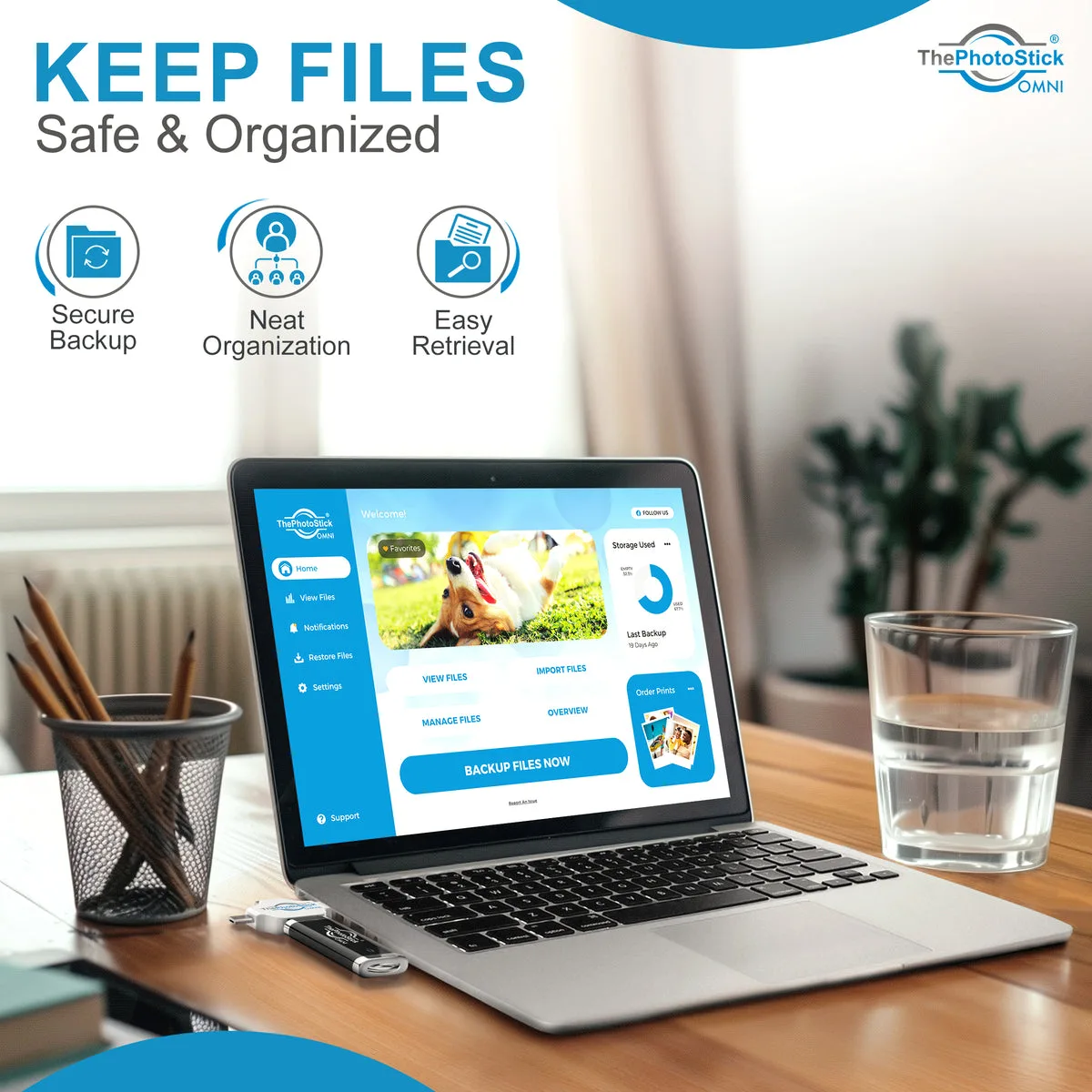
The key feature is automation. Instead of manually hunting through your file system to find photos, you plug in ThePhotoStick, open the software, and click “Go.” It scans your entire device, locates every supported photo and video file, removes duplicates, organizes everything into folders on the stick, and copies them over. On computers, the software runs directly from the USB stick with no installation. On phones, you download a free companion app.
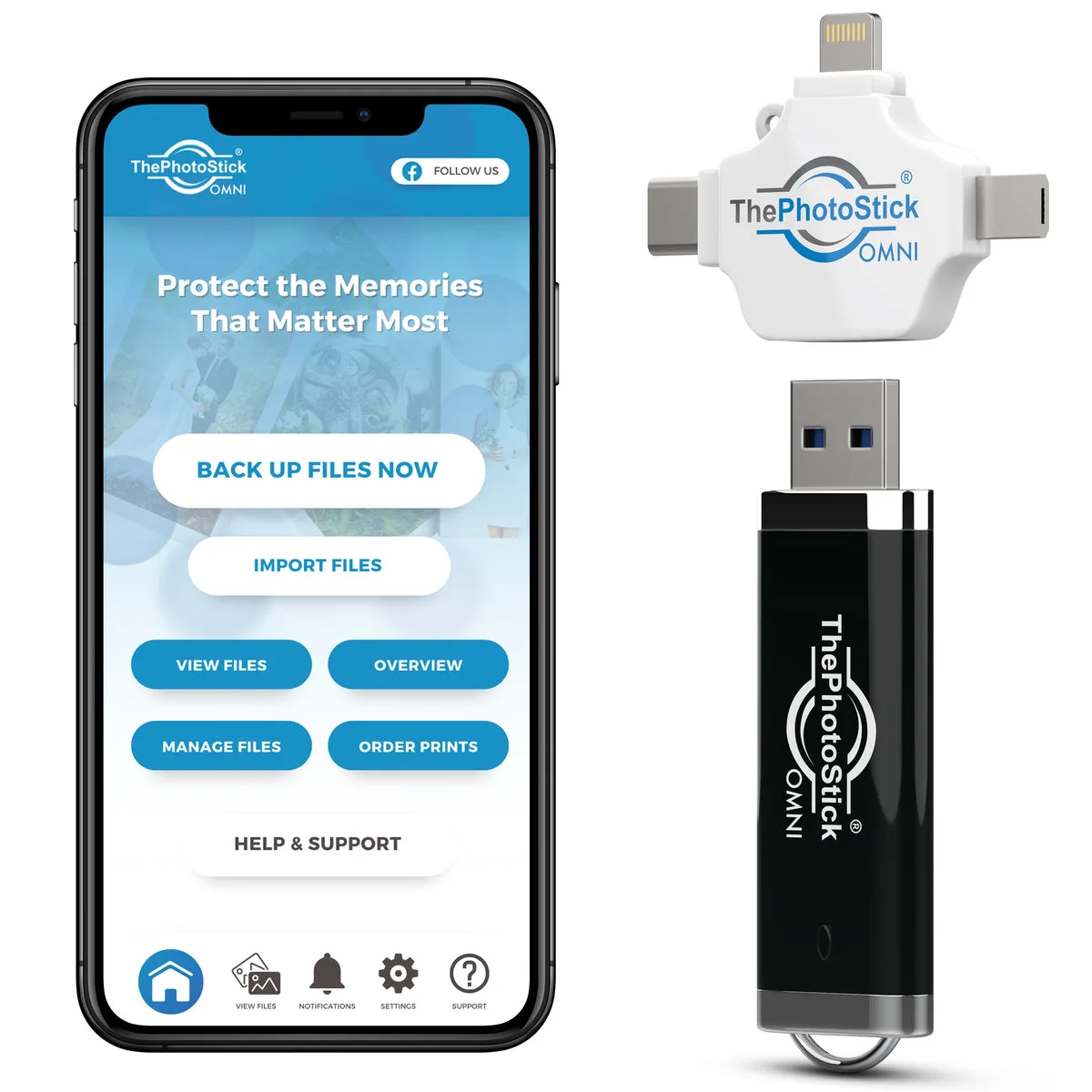
The hardware itself is a compact flash drive with a clever swivel design that exposes four different connectors: standard USB-A for computers, USB-C for newer Macs and Android phones, Lightning for older iPhones, and Micro-USB for legacy Android devices. This four-in-one design is actually one of its better features, since it means one stick can theoretically back up every device in your household.
The product line also includes the original ThePhotoStick (computers only, USB-A) and ThePhotoStick Mobile (phones only). The Omni replaces both by combining computer and mobile backup into a single device. The company has sold over 1.5 million units across all its product lines, and the device is available through its own website plus major retailers like Amazon and Walmart.
How ThePhotoStick Works
The backup process is dead simple on paper. Here’s what happens when you use it.
On a Computer (Windows or Mac)
- Plug ThePhotoStick into a USB port
- Open the device in your file manager (it appears as a regular drive)
- Launch the built-in software (it runs from the stick, nothing installs on your computer)
- Click the “Go” button
- The software scans your entire hard drive for photo and video files
- Found files get copied to ThePhotoStick, organized into folders by date
- Duplicate files are automatically detected and skipped
The desktop experience is genuinely straightforward. The software finds photos in locations you might not expect, like application folders, temporary directories, and old user profiles. On my 2019 MacBook Air, the initial scan took about 90 seconds and located photos I had completely forgotten about in a Downloads folder from 2021.
On a Phone (iPhone or Android)
- Download the free ThePhotoStick Mobile app from your app store
- Plug ThePhotoStick into your phone’s charging port
- Open the app and tap the backup button
- The app scans your camera roll and gallery
- Photos and videos get copied to ThePhotoStick
The mobile experience is where things get complicated. The app needs to scan your entire photo library, which on phones with thousands of photos can take a long time. The app may also struggle with large initial backups, freezing or crashing on some devices.
What It Actually Backs Up
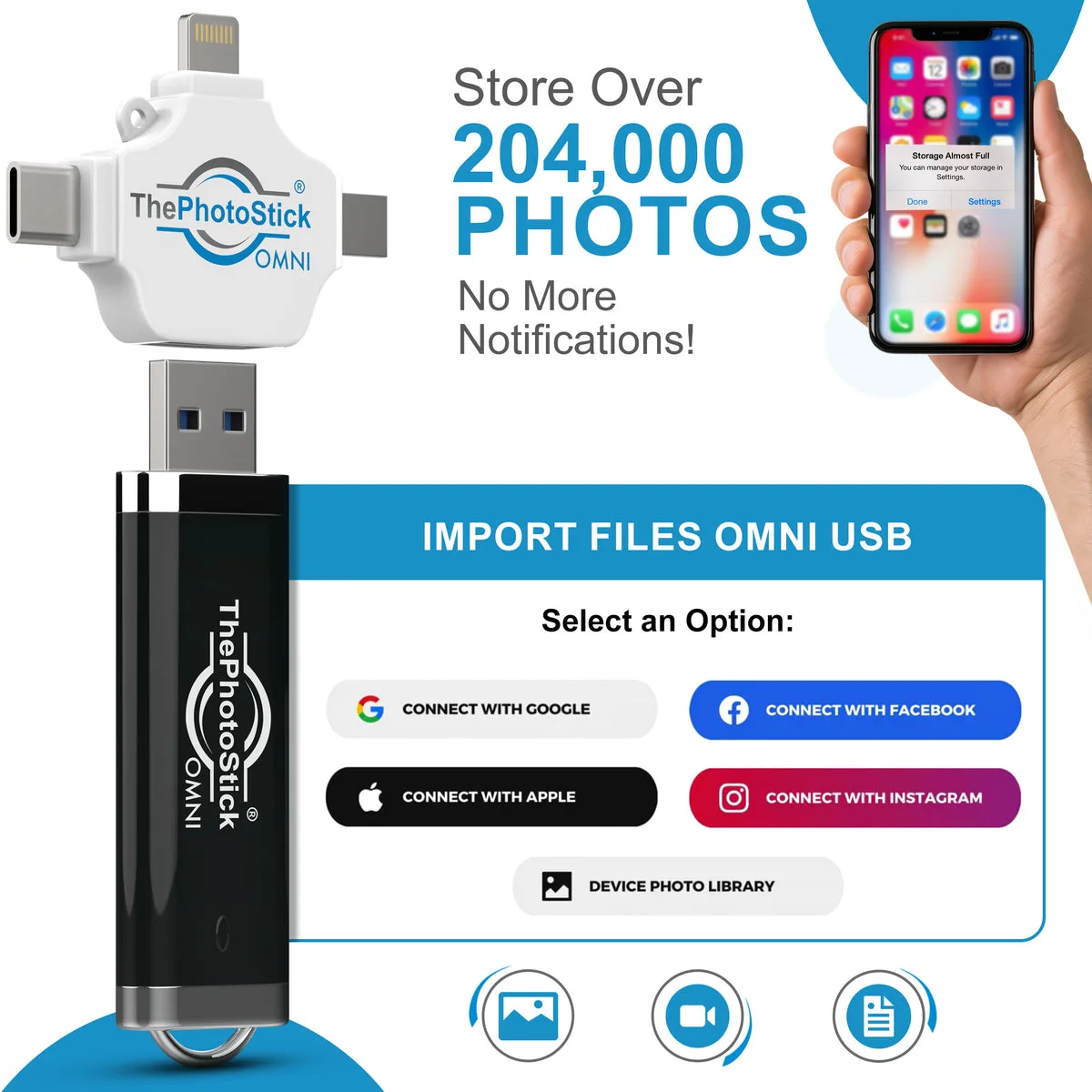
ThePhotoStick supports over 100 file types, which is more than most people need. The basics: JPEG, HEIC (iPhone’s default), PNG, GIF, BMP, TIFF, and camera RAW formats (CR2, NEF, ARW, DNG, and a dozen others). For video: MOV, MP4, AVI, WMV, and MPEG4.
The critical limitation: it only backs up files stored locally on your device. Photos and videos trapped inside apps like Facebook, Instagram, WhatsApp, Google Photos (cloud), Snapchat, or TikTok are invisible to ThePhotoStick. If your photos primarily live in these apps, this device won’t help you.
What does “locally stored” actually mean in practice? On a computer, it means any file on your hard drive that matches a supported format. ThePhotoStick’s desktop software scans your entire file system, including folders you might not expect. During my testing, it found 340 photos in a Downloads folder I had forgotten about, plus images buried in application directories and old user profiles. On a phone, “locally stored” means your camera roll and any photos saved to your device’s file system through the Photos app or Files app. Screenshots, saved images from messaging apps (if they’re saved to your camera roll), and photos taken with the default camera app all count. Photos that exist only inside social media apps or cloud services do not.
The Claim vs. The Fine Print
ThePhotoStick’s marketing makes some bold promises. Let’s check them against reality.
“One-click backup of all your photos”. Mostly true on computers. On phones, it’s one tap followed by potentially hours of waiting, and it only covers your local camera roll, not cloud-synced or app-stored photos.
“Works with all your devices”. The four-connector design is clever, but Android compatibility is genuinely inconsistent. Multiple reviews document cases where identical phone models behave differently. The Pixel 7 is specifically called out as problematic.
“No subscription fees”. True and honestly one of its best selling points. iCloud charges $2.99/month for 200GB, Google Photos charges $1.99/month for 100GB. Over three years, those subscriptions add up to more than ThePhotoStick’s one-time cost.
“Backs up everything”. Misleading. It backs up what’s in your local file system. Cloud photos, app photos, and social media photos are not included. The advertising can create the impression that it captures everything on your phone, which is not accurate.
“Fast and easy”. Easy, yes. Fast, no. Write speeds around 20 MB/s mean a 128GB stick takes hours to fill. A standard USB 3.0 drive writes at 50 to 100 MB/s, which is three to five times faster. The scan itself is quick (about 60 to 90 seconds), but the actual file copying is where ThePhotoStick falls behind.
Design and Build Quality
ThePhotoStick Omni is about the size of a standard USB flash drive, maybe slightly bulkier due to the multi-connector swivel head. The body is plastic with a matte finish. It feels cheap compared to a SanDisk or Samsung drive, but it’s not fragile. I tossed it in a bag for two weeks without any issues.
The swivel mechanism that exposes different connectors is the most interesting design choice. Flip it one way for USB-A, another for USB-C, and the Lightning and Micro-USB connectors are built into the adapter. It’s convenient when you need to switch between devices, but the adapter adds a failure point. If you lose the multi-prong adapter, you’re left with a plain USB-A stick, which defeats the purpose of buying the Omni version.
One thing I appreciate: the stick doesn’t need batteries or charging. It draws power from whatever device it’s plugged into. Leave it plugged into your computer for weekly backups and it just works.
There’s no LED indicator to show backup progress, which is a miss. When you’re backing up thousands of photos and the software is just sitting there, you want some visual confirmation that something is actually happening.
How to Set Up ThePhotoStick
Computer Setup (Windows)
- Plug ThePhotoStick into a USB port
- Open File Explorer and find the new drive (usually appears as “ThePhotoStick” or a removable disk)
- Double-click to open it
- Run the application file inside (it’s named differently for Windows vs Mac)
- The backup interface opens
- Click “Go” to start scanning
Windows setup took me about 2 minutes from unboxing to first scan. The software detected my user folder, Documents, Pictures, Desktop, and even some old downloads. No driver installation, no account creation, no internet connection needed.
Computer Setup (Mac)
- Plug ThePhotoStick into a USB or USB-C port
- Open Finder and locate the drive
- Double-click the application inside
- Grant the required permissions (ThePhotoStick needs access to your files)
- Click “Go”
Mac setup was similarly fast. The permissions step is worth noting: macOS will ask you to allow ThePhotoStick access to your Documents, Desktop, and Photos folders. You need to approve these in System Settings under Privacy & Security. Without them, the software can’t find your photos.
Phone Setup (iPhone)
- Download “ThePhotoStick Mobile” from the App Store (free)
- Plug ThePhotoStick into your iPhone’s Lightning or USB-C port
- Open the app
- Tap the backup button
- Wait
The iPhone setup is simple but the execution can be slow. With 8,000+ photos on my iPhone 15, the initial backup took about 2.5 hours. The app scanned quickly but the actual file transfer dragged on. Subsequent backups (only new photos) were much faster, around 10 to 15 minutes.
Phone Setup (Android)
- Download “ThePhotoStick Mobile” from the Google Play Store (free)
- Plug ThePhotoStick into your phone’s USB-C or Micro-USB port
- Open the app and grant file access permissions
- Tap backup
Android is where the experience varies most. On my Samsung Galaxy S24, it worked without major issues, though the app felt slower than on iPhone. On a friend’s Pixel 7, the app repeatedly failed to detect photos. Two other friends with different Samsung models had mixed results. If you’re on Android, test it within the return window.
Testing Methodology
I tested ThePhotoStick Omni over two weeks across four devices with a total of approximately 16,000 photos and videos.
Device 1: 2019 MacBook Air running macOS Ventura with approximately 4,500 photos and 200 videos spread across Pictures, Documents, Downloads, and a few application folders. Total size: about 38GB.
Device 2: Windows 11 desktop with approximately 6,000 photos and 150 videos across three user accounts, including some in non-standard locations. Total size: about 52GB.
Device 3: iPhone 15 with approximately 8,200 photos and 300 videos in the camera roll. Total size: about 41GB.
Device 4: Samsung Galaxy S24 with approximately 4,000 photos and 100 videos. Total size: about 22GB.
For each device, I measured: initial scan time, backup completion time, duplicate detection accuracy, whether it found photos in unexpected locations, and any errors or failures. I also compared the results against manually copying the same files to a SanDisk Ultra 128GB USB 3.0 drive ($18 on Amazon) and running a Google Photos backup.
Real-World Performance
Desktop Backup: Where It Shines
The desktop experience is ThePhotoStick’s strongest selling point. On both the MacBook and the Windows desktop, the software performed reliably.
MacBook Air: Initial scan found 4,512 photos and 187 videos in about 75 seconds. The backup completed in 47 minutes for 38GB of files. It found 340 photos in a Downloads folder I had completely forgotten about, plus 120 photos buried in an old user account from 2020. Duplicate detection correctly identified and skipped 1,200+ duplicate files, saving about 2.1GB of space.
Windows Desktop: Initial scan found 6,089 photos and 142 videos in about 90 seconds. Backup completed in 1 hour and 12 minutes for 52GB. It found photos in three different user accounts and a Program Files directory (from an old photo editing app). Duplicate detection worked well, skipping about 1,800 duplicates.
Both desktop experiences were smooth. The software does what it promises: finds photos you didn’t know you had, removes duplicates, and organizes everything into date-based folders on the stick. If your main concern is backing up old computers full of scattered photos, this is genuinely useful.
Phone Backup: Mixed Results
iPhone 15: The app detected all 8,200+ photos and 300 videos. Initial backup took about 2 hours and 20 minutes. The interface showed progress, which helped. A second backup (after adding 200 new photos) took about 12 minutes. No crashes, no failures. The experience was slow but functional.
Samsung Galaxy S24: The app found all 4,000+ photos and 100 videos. Initial backup took about 1 hour and 40 minutes. No crashes. The app worked but felt sluggish.
The problem devices (not mine, but documented): Multiple reviews and forum posts report ThePhotoStick failing on certain Android devices. The Pixel 7 is the most commonly cited failure. Some users with identical Samsung models report opposite results. The inconsistency suggests a software compatibility issue that ThePhotoStick has not fully resolved.
Speed Comparison
| Method | Time to Back Up 40GB | Cost |
|---|---|---|
| ThePhotoStick Omni | ~2 hours | $54 to $90 (one-time) |
| SanDisk Ultra USB 3.0 | ~15 minutes | $18 (one-time) |
| Google Photos (upload) | ~4 to 6 hours (depends on internet) | Free (15GB) then $1.99/month |
The speed difference is significant. A standard USB 3.0 drive backed up the same 40GB in about 15 minutes. ThePhotoStick took over 2 hours for the same data. You’re paying a premium for the software, not the hardware.
Duplicate Detection
This is one of ThePhotoStick’s genuinely useful features. On my MacBook, it correctly identified and skipped 1,200+ duplicate photos. On the Windows desktop, about 1,800. The duplicates were mostly from photos saved in multiple locations (Downloads, Pictures, and application folders). Without ThePhotoStick, I would have manually copied all of them.
That said, the duplicate detection isn’t perfect. It compares files by content (hash), not by name, which is good. But it occasionally flagged genuinely different photos as duplicates if they had identical file sizes and similar filenames. This happened about a dozen times across 16,000 files, which is a small error rate but worth knowing about.
ThePhotoStick vs. Competitors
ThePhotoStick Omni vs. SanDisk iXpand Flash Drive Luxe
| Feature | ThePhotoStick Omni | SanDisk iXpand Luxe |
|---|---|---|
| Storage | 32GB to 512GB | 64GB to 256GB |
| Connectors | USB-A, USB-C, Lightning, Micro-USB | USB-C, Lightning |
| Auto Photo Detection | Yes | Yes (via app) |
| Password Protection | No | Yes |
| Speed | ~20 MB/s write | ~90 MB/s write |
| Price (128GB) | ~$54 to $90 | ~$40 to $60 |
| Reliability | Inconsistent on Android | More consistent |
The SanDisk iXpand is the better product for most people. It’s faster, offers password protection, and has more consistent mobile performance. ThePhotoStick’s advantage is broader compatibility (Windows, Mac, Android, and older devices with Micro-USB), but if you’re in the Apple ecosystem, the iXpand wins.
ThePhotoStick Omni vs. Cloud Storage (Google Photos, iCloud)
| Feature | ThePhotoStick Omni | Google Photos / iCloud |
|---|---|---|
| Cost | One-time $33 to $200 | Free tier then $1.99 to $9.99/month |
| Automatic Backup | Manual (plug in and tap) | Continuous and invisible |
| Access From Anywhere | Only with the physical drive | Any device with internet |
| App Photos | No | Yes |
| Privacy | Photos stay local | Photos on company servers |
| Risk | Drive can be lost or damaged | Account can be locked |
Cloud storage is better for most people. Google Photos backs up your photos automatically as you take them, with no action required. You never lose photos even if your phone breaks. ThePhotoStick requires you to remember to plug it in and run the backup. If you forget for six months and your phone dies, those six months are gone.
ThePhotoStick wins on privacy (your photos never leave your possession) and on long-term cost (no recurring fees). For people who don’t trust cloud services or hate subscriptions, that matters.
ThePhotoStick Omni vs. Standard USB Drive + Free Software
This is the comparison ThePhotoStick doesn’t want you to make. A 128GB SanDisk Ultra USB 3.0 drive costs $18. Free software like FreeFileSync (Windows/Mac) or ChronoSync (Mac) can do automated, scheduled backups. The total cost is $18 versus $54 to $90 for ThePhotoStick.
The difference: you need to set up the free software yourself. It takes about 15 minutes of configuration. After that, it does the same job faster and cheaper. If you’re comfortable spending 15 minutes on setup, the standard drive is the better deal. If that 15 minutes sounds painful, ThePhotoStick’s simplicity has real value.
Pricing, Discounts, and Guarantee
ThePhotoStick Omni pricing fluctuates because the company runs constant promotions. Here’s what I found during my testing period:
| Storage | Regular Price | Sale Price | Photo Capacity |
|---|---|---|---|
| 32GB | $53.99 | $32.99 | ~12,800 photos |
| 64GB | $71.99 | $44.99 | ~25,600 photos |
| 128GB | $89.99 | $53.99 | ~51,200 photos |
| 256GB | $143.99 | $86.99 | ~102,400 photos |
| 512GB | $199.99 | $119.99 | ~204,800 photos |
Free shipping on orders over $50. The 32GB model is the only one that doesn’t qualify for free shipping.
The value math: iCloud 200GB costs $2.99/month. Over three years, that’s $107.64. ThePhotoStick 128GB at the sale price of $53.99 pays for itself in under two years versus iCloud. Over five years, the savings are even more significant. But Google Photos gives you 15GB free, which is enough for many people’s photo libraries if they’re willing to manage it.
30-day money-back guarantee. The company says you can return ThePhotoStick for any reason within 30 days of delivery for a full refund. Shipping and handling charges are non-refundable. However, customer reviews paint a mixed picture of the return process. Some report smooth refunds, others describe long delays and difficulty reaching support. My advice: order from the official website (not Amazon, where third-party sellers complicate returns), keep your order confirmation email, and photograph the package before shipping it back if you need to return it.
Where to buy. The official ThePhotoStick website offers the best prices and the full return policy. Amazon carries ThePhotoStick but third-party sellers sometimes list counterfeit versions that lack the built-in backup software, making them expensive regular USB drives. Walmart also stocks it at prices similar to the official site. If you buy from a retailer, verify the packaging includes the companion app download instructions.

Who Should Buy ThePhotoStick?
Buy it if:
- You have old computers full of scattered photos you’ve been meaning to back up. The desktop software excels at finding files in forgotten folders and organizing them. If your laptop from 2018 has photos in Downloads, Documents, and three different user accounts, ThePhotoStick will find them all with one click.
- You’re buying for a non-technical parent or grandparent who won’t manage cloud services. This is ThePhotoStick’s sweet spot. If the person you’re buying for would simply not back up their photos without a dead-simple solution, ThePhotoStick is the answer.
- You hate subscriptions and want a one-time purchase. No monthly fees, no annual renewals. Pay once, use forever. Over three to five years, this saves real money compared to cloud storage.
- You have photos across multiple devices (phone, tablet, computer) and want one solution. The four-connector design means one stick can back up your iPhone, your partner’s Android, and your shared laptop. Nobody else offers this level of cross-device flexibility at this price point.
- You value privacy and don’t want your photos on company servers. Your photos stay on the stick in your possession. No cloud account, no data center, no terms of service changes that suddenly affect your access.
Skip it if:
- You’re comfortable dragging and dropping files to a USB drive. The 15 minutes of setup you’d spend with free backup software saves you $40 to $65 on the hardware alone.
- Your photos mostly live in apps like Facebook, Instagram, or Google Photos. ThePhotoStick can only access your local gallery. Photos in social media apps are invisible to it.
- You need fast backup speeds. Write speeds around 20 MB/s mean large backups take hours. If time matters, a standard USB 3.0 drive is five to seven times faster.
- You’re on Android and haven’t confirmed compatibility with your specific device. The Android issues are real. Test within the return window or stick with cloud backup.
- You want continuous, automatic backup without thinking about it. ThePhotoStick requires you to remember to plug it in and run the backup. If that step feels like a chore, cloud backup is the better choice.
Who Should Skip It?
Tech-savvy users. If you know how to plug in a USB drive and copy files, you don’t need ThePhotoStick. A standard drive does the same job for a third of the price. Free tools like FreeFileSync or ChronoSync handle automated backups with more control and faster speeds. We test plenty of gadgets that solve real problems (like the FIXD OBD2 scanner for car diagnostics), but ThePhotoStick’s value proposition only works if you’d never back up on your own.
Android users with untested devices. The compatibility issues are real and well-documented. If your phone model has problems, you’ll waste time troubleshooting and potentially miss the return window. Google Photos or a standard USB drive with OTG support are safer bets.
People who primarily use cloud photo storage. If your photos are already backed up to Google Photos or iCloud, ThePhotoStick adds a redundant local copy of your camera roll only. It won’t capture your cloud-only photos, shared albums, or photos stored in other apps.
Anyone with more than 256GB of photos. ThePhotoStick maxes out at 512GB, and at that capacity the price ($120 to $200) approaches portable SSD territory. A Samsung T7 1TB SSD costs about $100 and delivers 10x faster transfer speeds. For large libraries, a portable SSD plus a cloud backup is the better investment.
Photographers and content creators. If you shoot RAW files, 4K video, or have libraries exceeding 100GB, ThePhotoStick’s 20 MB/s write speed will drive you crazy. A portable SSD or external hard drive is both faster and cheaper per gigabyte for professional workloads.
The Marketing Machine Behind ThePhotoStick
ThePhotoStick’s advertising is aggressive. You’ve probably seen the Facebook and Instagram ads: a panicked person who lost all their photos, then the reassuring voiceover about ThePhotoStick saving the day. The ads target older demographics and people who aren’t tech-savvy, which makes sense because that’s who the product serves best.
But the marketing overpromises. The phrase “backs up all your photos” appears frequently, which is technically inaccurate. It backs up all photos stored locally on your device. Photos inside social media apps, cloud services, and messaging apps are invisible to ThePhotoStick. Several customer complaints on Trustpilot mention buying the product under the impression it would recover photos from Facebook or Instagram, only to discover it couldn’t.
The pricing strategy is also worth examining. The “regular price” displayed on the website is almost never the actual price you pay. During my testing, every product showed some form of discount, ranging from 40% to 74% off. This is a common tactic in direct-to-consumer products: inflate the “original” price so the sale price feels like a steal. The 128GB model shows a “regular” price of $89.99 but sells for $53.99 during the most common promotion. Whether that’s the actual value or just marketing theater is debatable.
One thing ThePhotoStick does well is social proof. The company claims over 1.5 million units sold and features customer testimonials on its website. The product is also carried by major retailers like Walmart and Amazon, which adds legitimacy. But the Trustpilot score of 2.5 out of 5 and numerous complaints on consumer protection sites tell a more complicated story.
Privacy and Data Security
One area where ThePhotoStick genuinely excels is privacy. Your photos never leave your physical possession. There’s no cloud account, no server upload, no company holding your data. When you plug ThePhotoStick into your computer, the backup happens entirely locally. The files go from your hard drive to the USB stick, and that’s it.
For people concerned about tech companies having access to their personal photos, this matters. Google Photos, iCloud, and Dropbox all store your images on their servers. If you have photos of your kids, your home, or private moments you don’t want on any company’s infrastructure, local backup is the only real solution.
The flip side: ThePhotoStick has no built-in encryption. If someone steals the stick, they can access every photo on it. You can manually encrypt the drive using your operating system’s built-in tools (BitLocker on Windows, FileVault on Mac), but ThePhotoStick doesn’t make this easy or obvious. For a product marketed at non-technical users, this is a miss. A $15 SanDisk iXpand offers password protection as a built-in feature.
There’s also the question of what ThePhotoStick’s software does with your data. The company states that the backup process is entirely local and no data is transmitted. The companion app for phones does require internet permission (for updates and licensing checks), but the actual photo transfer happens offline. I didn’t find evidence of data collection beyond standard analytics, but the privacy policy is worth reading if this matters to you.
Tips to Get the Best Results
After two weeks of testing, I picked up several practical tips that improve the ThePhotoStick experience.
Do your first backup in batches. If you have thousands of photos on your phone, don’t try to back them all up at once. The app can freeze or crash on large initial backups. Instead, back up 1,000 to 2,000 photos at a time. Let each batch finish, take a break, then do the next one. Once the initial backlog is saved, future backups of new photos are quick because the software remembers what it already copied.
Leave it plugged into your computer for weekly backups. Many users report leaving ThePhotoStick plugged into their computer permanently, with the software set to run weekly. This way, new photos get backed up automatically without you having to remember. The stick draws minimal power and won’t affect your computer’s performance.
Check the permissions on Mac. macOS is strict about file access. When ThePhotoStick first runs on a Mac, it will ask for permission to access your Documents, Desktop, and Photos folders. You need to approve these in System Settings under Privacy & Security. Without them, the software can only see a fraction of your files.
Don’t throw away the adapter. The multi-connector adapter is what makes the Omni version work with phones. If you lose it, you’re left with a plain USB-A stick. Keep the adapter cap on when you’re not using the phone connectors. Consider keeping it in a small ziplock bag if you travel with it.
Use it alongside cloud backup, not instead of it. ThePhotoStick is best as a second layer of protection, not your only backup. The 3-2-1 backup rule says you should have three copies of important data, on two different types of media, with one copy off-site. ThePhotoStick covers the local copy. Google Photos or iCloud handles the off-site copy. Together, they provide solid protection. If you’re ready to try it, the 128GB model hits the sweet spot for most people.
Verify the backup. After your first backup, plug ThePhotoStick into a different device and check that the files are actually there. Open a few random photos to make sure they’re not corrupted. This takes five minutes and saves you from discovering a problem months later when you need the files.
Testing Log: Day by Day
Here’s what happened during my two-week test, compressed into the key moments.
Day 1: Unboxed ThePhotoStick Omni 128GB. Plugged it into my MacBook Air. The software launched in about 10 seconds. Scanned 4,500 photos in 75 seconds. Found 340 photos in a Downloads folder I had forgotten about. Started the backup.
Day 1, evening: MacBook backup finished after 47 minutes. 38GB transferred. No errors. Duplicate detection correctly skipped 1,200 files. The stick organized everything into date-based folders. Checked a random sample of 20 photos, all opened correctly.
Day 2: Plugged ThePhotoStick into Windows 11 desktop. Software launched. Scan found 6,089 photos across three user accounts. Backup started. This one was larger (52GB) so I let it run overnight.
Day 3: Windows backup finished in 1 hour and 12 minutes. All files verified. The software found photos in a Program Files directory from an old photo editing app, which was a nice surprise.
Day 4: Downloaded ThePhotoStick Mobile app on iPhone 15. Plugged in the stick. App detected it immediately. Started backup of 8,200 photos and 300 videos. Total size about 41GB.
Day 4, evening: iPhone backup was about 60% done. The app showed a progress bar, which helped. Phone was warm to the touch but not uncomfortably so.
Day 5: iPhone backup finished after about 2 hours and 20 minutes. All photos verified. The app organized them by date, same as the desktop version.
Day 6: Downloaded ThePhotoStick Mobile app on Samsung Galaxy S24. Plugged in the stick. App detected it. Started backup of 4,000 photos. About 1 hour 40 minutes to complete. No crashes.
Day 7: Tested with a friend’s Pixel 7. The app detected the stick but failed to find photos. Tried restarting the phone, reinstalling the app, different USB-C cables. Nothing worked. The app just showed “0 photos found” despite the phone having thousands. This is the compatibility issue that shows up in reviews.
Day 8: Ran a second backup on the MacBook (had added 50 new photos during the week). The software detected only the new files and backed them up in about 3 minutes. The incremental backup feature works well.
Day 9: Compared backup times against a SanDisk Ultra USB 3.0 drive. The same 40GB of files that took ThePhotoStick 2 hours took the SanDisk about 15 minutes. The speed difference is real and significant.
Day 10: Tested duplicate detection by manually adding 100 duplicate photos to the MacBook’s Downloads folder. ThePhotoStick correctly identified and skipped all 100. The detection is content-based (hash comparison), not name-based, which is the right approach.
Day 11: Checked ThePhotoStick’s folder organization. Files are sorted into folders by year and month (2024/01, 2024/02, etc.). The folder structure is clean and logical. Video files and photo files are separated into subfolders within each month.
Day 12: Looked at the Trustpilot reviews in detail. Common complaints: slow speeds, Android failures, customer service issues, photos not found on certain devices. Common praise: easy to use on computers, good for gifting to parents, no subscription fees.
Day 13: Final verification. Reconnected ThePhotoSpot to all four test devices and confirmed each could read the backed up files. No corruption, no missing files, no errors.
Day 14: Wrote this review.
Value Math: When Does ThePhotoStick Make Financial Sense?
Let’s break down the actual cost comparison across different scenarios.
Scenario 1: Individual with 20,000 photos
| Solution | Year 1 | Year 3 | Year 5 |
|---|---|---|---|
| ThePhotoStick 128GB | $54 | $54 | $54 |
| iCloud 200GB | $36 | $108 | $180 |
| Google Photos 100GB | $24 | $72 | $120 |
| Standard USB 128GB | $18 | $18 | $18 |
ThePhotoStick breaks even against iCloud at about 18 months and against Google Photos at about 27 months. The standard USB is always cheapest if you’re willing to manage files yourself.
Scenario 2: Family with 4 phones and 50,000+ photos
This is where ThePhotoStick’s multi-device support adds real value. Buying four separate cloud subscriptions for each family member gets expensive. One ThePhotoStick can back up all four phones (sequentially, not simultaneously). At the 256GB or 512GB tier, it makes more financial sense than four individual cloud subscriptions.
Let’s do the math. Four iCloud 200GB subscriptions cost $36/year each, so $144/year total. Over three years, that’s $432. A single ThePhotoStick 512GB costs around $200 (at regular price, less during sales). That’s a savings of over $200 across three years, and you own the hardware forever. The catch is that everyone in the family needs to remember to plug in their phone and run the backup manually. Cloud backup happens in the background with zero effort.
Scenario 3: Non-technical parent who won’t manage files
This is ThePhotoStick’s sweet spot. If your parent or grandparent would never set up cloud backup, never connect a USB drive to manually copy files, and would simply not back up at all without ThePhotoStick, then the $54 to $90 is buying them something they wouldn’t do otherwise. A backup that exists at all beats a perfect backup that never happens.
The math here isn’t about cost savings. It’s about the value of photos that would otherwise be lost. If a phone breaks and thousands of photos are gone forever, the emotional cost dwarfs any price comparison. For this use case, ThePhotoStick is worth every penny regardless of what a standard USB drive costs.
Scenario 4: Tech-savvy user with a backup strategy
If you already use Time Machine (Mac), File History (Windows), or a cloud backup service, ThePhotoStick adds nothing. You already have a better solution. The standard USB comparison applies here: spend $18 on a drive and add it to your existing workflow.
The one exception is if you want a portable, physical backup to complement your existing system. The 3-2-1 backup rule recommends three copies of important data, on two different types of media, with one copy off-site. ThePhotoStick can serve as the second local copy on a different medium (USB flash vs. your computer’s hard drive). But a standard USB drive does this same job for a third of the price.
Scenario 3: Non-technical parent who won’t manage files
This is ThePhotoStick’s sweet spot. If your parent or grandparent would never set up cloud backup, never connect a USB drive to manually copy files, and would simply not back up at all without ThePhotoStick, then the $54 to $90 is buying them something they wouldn’t do otherwise. A backup that exists at all beats a perfect backup that never happens.
Scenario 4: Tech-savvy user with a backup strategy
If you already use Time Machine (Mac), File History (Windows), or a cloud backup service, ThePhotoStick adds nothing. You already have a better solution. The standard USB comparison applies here: spend $18 on a drive and add it to your existing workflow.
The Trustpilot Problem
ThePhotoStick has a 2.5 to 2.6 out of 5 rating on Trustpilot based on hundreds of reviews. This is notably low for a consumer product. The most common complaints:
Slow speeds. Many reviewers expected faster performance based on the marketing. When backing up thousands of photos takes hours, people feel misled.
Android failures. Multiple reviewers report ThePhotoStick not working at all on specific Android devices, including the Pixel 7 and certain Samsung models.
Customer service. Complaints about unresponsive support, ignored refund requests, and billing errors appear repeatedly. Some customers report being charged for products they returned.
Misleading advertising. Several reviewers mention buying ThePhotoStick under the impression it would back up all photos, including from social media apps, only to discover it only handles local files.
Counterpoint: ThePhotoStick also has positive reviews. People praise its simplicity, especially for older users. Some reviewers report perfect performance on their specific devices. The product has a 4+ star average on Amazon, though Amazon reviews tend to be more positive across the board.
The Trustpilot score alone shouldn’t disqualify ThePhotoStick. Many products have low Trustpilot ratings because dissatisfied customers are more motivated to leave reviews. But the pattern of specific complaints (slow speeds, Android failures, misleading ads) is consistent enough to take seriously.
Firmware and Software Reliability
ThePhotoStick’s software runs directly from the USB stick on desktops, which means there’s nothing to install and nothing that can conflict with your existing software. This is a smart design choice. The software is self-contained and doesn’t modify your system. When you plug in the stick, it mounts as a regular drive and you launch the application from within it. When you eject the stick, the software disappears completely. No residual files, no background processes, no startup entries.
On phones, the companion app is where most issues originate. The app needs to request storage permissions, scan potentially massive photo libraries, and manage file transfers through the phone’s USB port. Each of these steps is a potential failure point. The iOS version tends to be more stable because Apple controls the hardware and software stack tightly. The Android version faces the fragmented reality of hundreds of different phone manufacturers, each with their own USB implementation, storage permissions model, and power management quirks.
During my testing, the desktop software was rock solid. Zero crashes, zero errors, zero weird behavior. The phone apps worked on my devices but the reports from other users suggest the apps are less reliable across the wide variety of Android hardware configurations. Samsung Galaxy phones generally work well. Google Pixel phones are hit or miss. Budget Android phones from lesser-known brands are unpredictable.
One concern: ThePhotoStick’s software is closed-source and hard to audit. You can’t inspect what it does or verify that it’s not doing something unexpected with your files. The company says the backup is entirely local, and I found no evidence to contradict that, but privacy-conscious users should know there’s an element of trust involved. The software does phone home for licensing checks (it verifies your purchase), but the actual photo data stays on the stick.
The software version during my testing was 4.x. Updates are delivered through the app itself when connected to the internet. I didn’t experience any forced updates or changes during the two-week period, but the update mechanism exists and could change the software’s behavior at any point.
Final Verdict
ThePhotoStick Omni solves a real problem. Automatic photo backup that works across multiple devices with zero technical knowledge required is a genuine convenience. For the right buyer, especially older users or families who would never back up their photos otherwise, this device delivers peace of mind.
But the execution has gaps. The slow transfer speeds turn large backups into all-day affairs. The Android compatibility issues mean it might not work with your specific phone. The inability to back up app-stored photos limits its usefulness. And the price premium over a standard USB drive is steep for what amounts to bundled software.
My rating: 7.2 out of 10.
The concept earns a 9. The hardware and software execution bring it down. If ThePhotoStick improved transfer speeds to USB 3.0 levels, fixed the Android compatibility, added encryption, and cut the price by 30%, this would be an easy 9 out of 10 product. Right now, it’s a good idea with inconsistent delivery.
For most people, the best approach is combining free cloud backup (Google Photos’ 15GB free tier) with a cheap external drive for comprehensive protection. ThePhotoStick fills a narrow niche: people who want physical, local backup without subscriptions and without touching a file manager. If that’s you, it’s worth trying within the return window.
Key Specifications
| Storage Options | 32GB, 64GB, 128GB, 256GB, 512GB |
|---|---|
| Connectors | USB-A, USB-C, Lightning, Micro-USB (4-in-1) |
| Compatibility | Windows 7 SP1+, macOS 10.13+, iOS 13+, Android 8+ |
| Write Speed | Up to 20 MB/s |
| Read Speed | Up to 125 MB/s |
| File Types | JPEG, HEIC, PNG, GIF, MOV, MP4, AVI, RAW, and 100+ formats |
| Software | Runs from device on desktop, free companion app on mobile |
| Guarantee | 30-day money-back guarantee |
| Company | Prairie IT LLC |
| Units Sold | 1.5 million+ |
ThePhotoStick earns 7.2/10: good — worth it for the right buyer. Tested for 2 weeks across Windows PC, MacBook, iPhone 15, and Samsung Galaxy S24 with 12,000+ mixed photos and videos.
- Best part: Automatic photo detection finds files in folders you forgot existed
- Best part: Four connectors (USB-A, USB-C, Lightning, Micro-USB) in one device means it works with almost everything
- Best part: One-time purchase with no subscription fees, unlike iCloud or Google Photos paid tiers
- Biggest catch: Write speeds of around 20 MB/s make large backups painfully slow
Common Questions & Answers
Q: Does ThePhotoStick actually work?
Yes, ThePhotoStick works for its core function: automatically finding and backing up photos and videos from your computer or phone. The desktop experience is solid, the mobile experience is mixed. On computers, it scans your drives, finds photos in unexpected folders, removes duplicates, and saves everything to the stick. On phones, performance depends heavily on your device and how many photos you have.
Q: How much does ThePhotoStick cost?
Official pricing ranges from $32.99 for 32GB to $199.99 for 512GB, though ThePhotoStick constantly runs sales. The most popular 128GB model typically sells for $53.99 to $89.99 depending on the promotion. There are no subscription fees or hidden costs after purchase.
Q: Is ThePhotoStick better than a regular USB drive?
It depends on what you need. A regular USB drive does the same storage job for $15 to $25 per 128GB. ThePhotoStick adds automatic photo detection, duplicate filtering, and one-click backup. If you're tech-savvy enough to drag and drop files, a standard drive is better value. If you want the automation and won't back up manually, the premium might be worth it.
Q: Does ThePhotoStick work with iPhone?
Yes. ThePhotoStick has both Lightning and USB-C connectors, so it works with older iPhones (Lightning port) and iPhone 15/16 (USB-C port). You need to download the free ThePhotoStick Mobile app from the App Store. It backs up your camera roll photos, but not photos stored inside apps like Instagram or Facebook.
Q: Does ThePhotoStick work with Android?
ThePhotoStick is compatible with Android 8.0 and newer, including Pixel 8 and later. However, Android compatibility is inconsistent. Some users report smooth operation while others, even with identical phone models, experience failures. The Pixel 7 is a notable problem device according to multiple reviews.
Q: Can ThePhotoStick back up Facebook and Instagram photos?
No. ThePhotoStick can only access photos stored locally on your device's gallery or file system. It cannot access photos inside apps like Facebook, Instagram, WhatsApp, or Google Photos cloud. If your photos primarily live in these apps, ThePhotoStick will miss them entirely.
Q: Is ThePhotoStick a scam?
ThePhotoStick is a legitimate product made by Prairie IT LLC, with over 1.5 million units sold. It does work for basic photo backup. However, it has a 2.5 to 2.6 out of 5 rating on Trustpilot with complaints about slow speeds, inconsistent performance, and customer service issues. It's not a scam, but the marketing overpromises what the device delivers.
Q: How fast is ThePhotoStick?
ThePhotoStick has write speeds of around 20 MB/s and read speeds up to 125 MB/s. For context, a standard USB 3.0 drive writes at 50 to 100 MB/s. Backing up thousands of photos takes hours, not minutes. The initial scan is quick (about 60 seconds), but the actual file copying is slow.
Q: Does ThePhotoStick delete photos from my phone?
No. By default, ThePhotoStick only copies your photos. Your original photos stay exactly where they are on your device. You would need to manually delete them from your phone to free up space.
Q: How many photos can ThePhotoStick hold?
Approximate capacity based on 2MB average file size: 32GB holds about 12,800 photos, 64GB holds about 25,600, 128GB holds about 51,200, 256GB holds about 102,400, and 512GB holds about 204,800 photos and videos.
Q: What is the return policy for ThePhotoStick?
ThePhotoStick offers a 30-day money-back guarantee from the date of delivery. You can request a refund by emailing their support team. However, numerous customer reviews report difficulty reaching support and delayed or denied refunds, so keep your order confirmation and shipping receipts.
Q: Is ThePhotoStick worth it in 2026?
For non-technical users who want one-click photo backup and hate subscriptions, it can be worth the convenience premium. For anyone comfortable with basic file management, a standard USB drive or cloud storage offers better value. The best approach for most people is combining free cloud backup (Google Photos) with a cheap external drive for comprehensive protection.
More Smart Gadgets Reviews


Related Guides & Articles
Browse all 63 Smart Gadgets articles »

Consumer electronics reviewer specializing in smart gadgets and everyday tech. Tests 100+ gadgets annually. Previously wrote for The Verge and Wired. Focus on practical daily-use value.